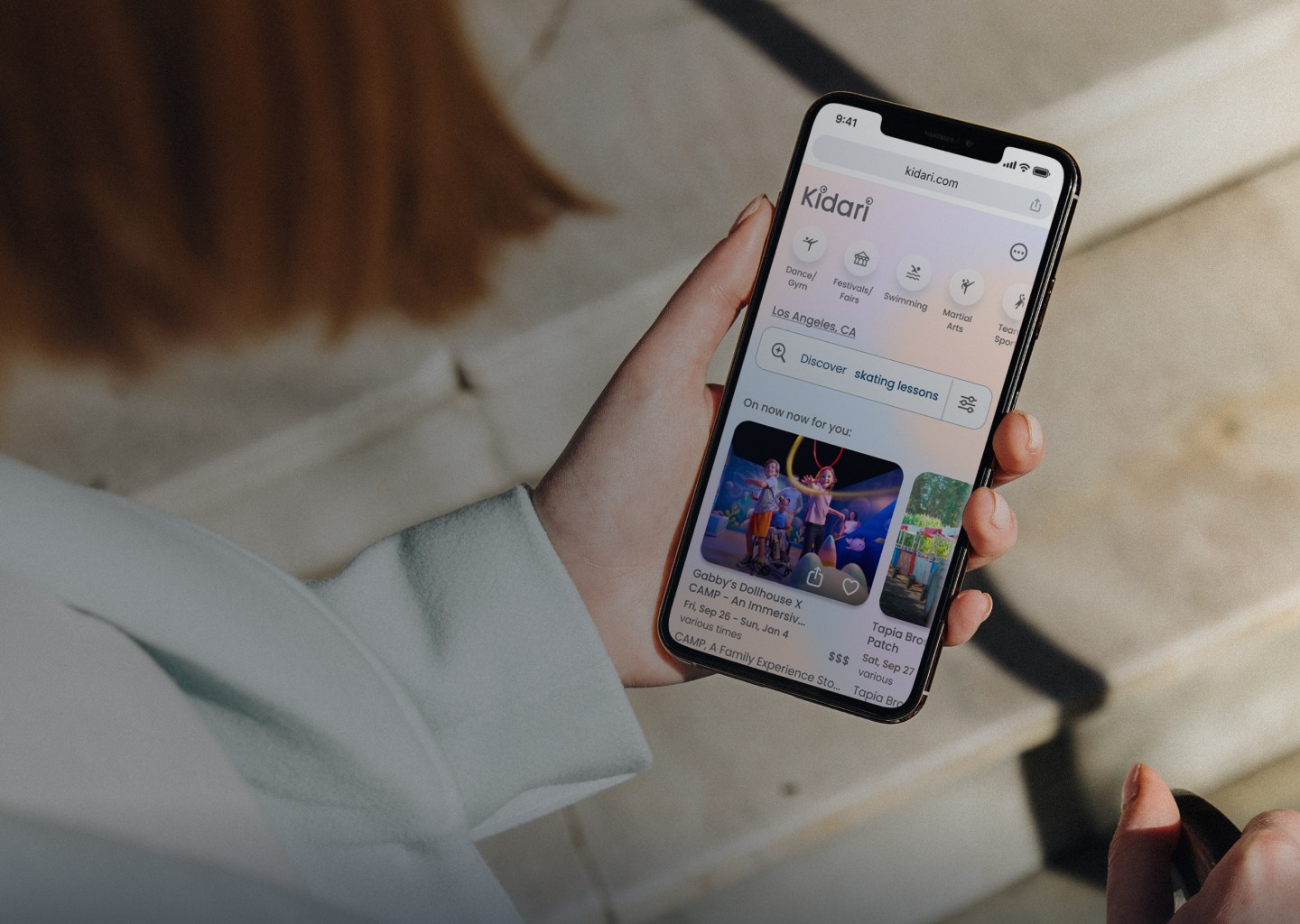
KIDARI
A smart activity discovery app for LA parents
duration
10 weeks
tools
Figma / Miro / Google forms / Google spreadsheets / Adobe Illustrator / Pen & Paper
my role
I led the UX process from research to testing, designing a tool that reduces planning stress and supports confident decisions for parents, grounded in real feedback.
KIDARI
A smart activity discovery app for LA parents
duration
10 weeks
tools
Figma / Miro / Google forms / Google spreadsheets / Adobe Illustrator / Pen & Paper
my role
I led the UX process from research to testing, designing a tool that reduces planning stress and supports confident decisions for parents, grounded in real feedback.
LA county is home to 873,000+ households with children under 18.
problem
LA parents feel overwhelmed by the mental load of finding and planning family activities because event information is scattered and hard to trust.
LA parents feel overwhelmed by the mental load of finding and planning family activities because event information is scattered and hard to trust.
SOLUTION
Kidari is a smart web app that helps parents quickly discover activities with the details they need to plan confidently through...
Kidari is a smart web app that helps parents quickly discover activities with the details they need to plan confidently through...
Personalized discovery
Personalized discovery
Tailored home feed based on each child’s profile
AI assistant that suggests activities based on family profiles and real-time requests
Quick chip filters to surface relevant options fast

Clear Logistics Up Front
Clear Logistics Up Front
Parking, fees, crowd notes, and timing guidance to reduce day-of surprises
“Know before you go” details so parents can prepare with confidence
Booking information and refund policies available at a glance
Designed for Real-Life Constraints
Designed for Real-Life Constraints
Flexible filters that support budget, distance, and accessibility needs
Filters that work for multiple ages and interests
Tools that help parents save, share, and coordinate to reduce the mental load
Empathize
White papers
Parents are not struggling to find activities. They are struggling with the time, stress, and uncertainty it takes to make the right choice.
Parents are not struggling to find activities. They are struggling with the time, stress, and uncertainty it takes to make the right choice.
Secondary research shows that parents face real barriers to planning family activities. Many rely on multiple tools yet still miss out on events, and the stress of logistics, cost, and uncertainty can lead families to stay home even when they want shared experiences.
competitors
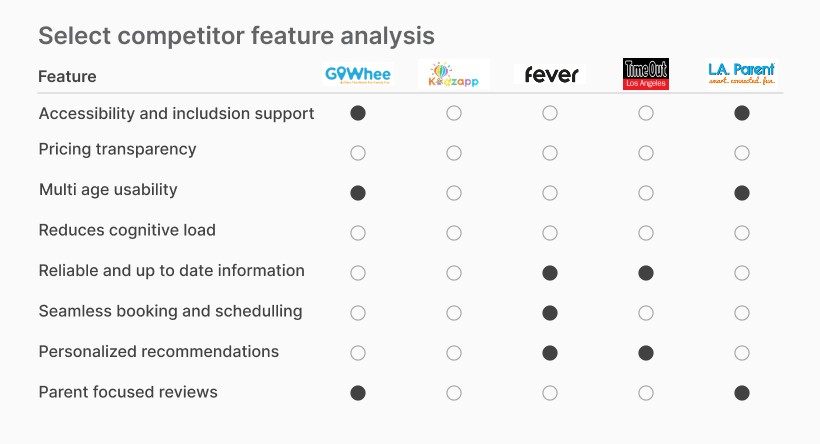
No single platform delivers a clean, intuitive experience that also reflects the realities of planning with kids.
No single platform delivers a clean, intuitive experience that also reflects the realities of planning with kids.
A heuristic analysis revealed that while other platforms offer curated content or strong booking flows, none meaningfully reduce the stress parents feel when evaluating logistics, cost, and accessibility.
A feature analysis revealed that competitors each excel in isolated areas, but none provide the full support parents need to confidently plan family activities.
interviews
Parents feel excited to plan family experiences, but logistics, cost, and confidence in event fit create friction
Parents feel excited to plan family experiences, but logistics, cost, and confidence in event fit create friction
After conducting a screener survey, I interviewed 5 parents across Los Angeles County with children ranging from toddlers to teens. While motivations and resources varied, core patterns emerged.
Screener Survey (22 respondents) results
Screener Survey (22 respondents) results
“Do you ever struggle to find and plan events or activities that fit your family’s needs?”
Yes, often
Yes, often
Sometimes
Sometimes
Rarely
Rarely
Never
Never
41%
32%
32%
23%
23%
4%
4%
41%

K. Green
K. Green
Married mother of 3
Kids ages: 3, 14, 17
”It’s most challenging to find something that’s interesting for all three kids.”
Define
Pain points
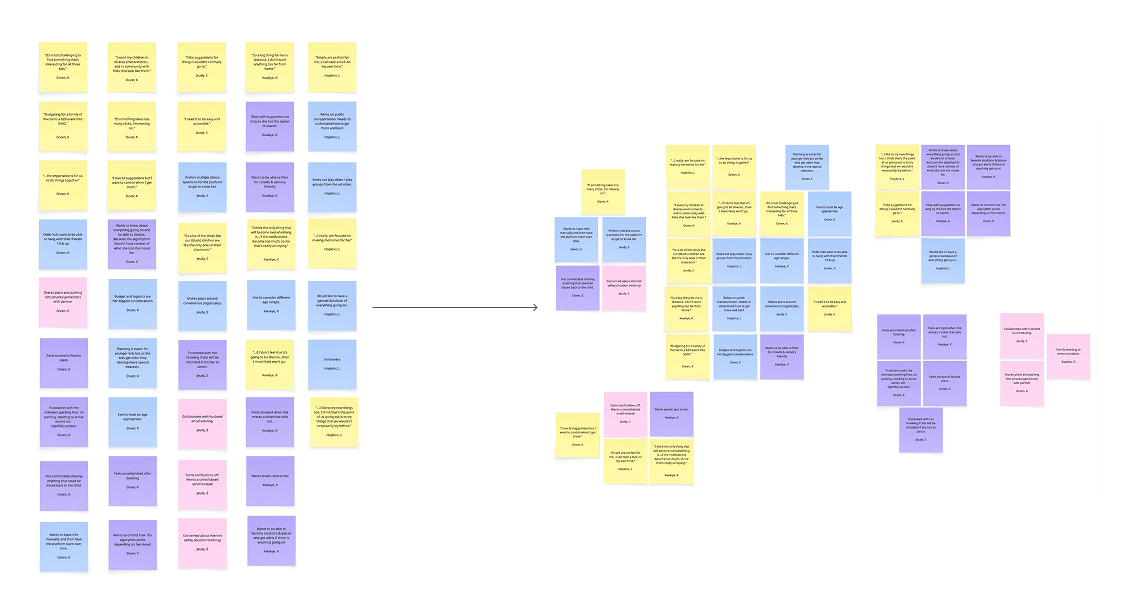
After organizing themes across interviews with both single and partnered parents, I created two empathy maps to reflect their different realities. Across both groups, several core pain points emerged. These represent the real obstacles parents face before they ever make it out the door.
Hidden logistics
Limited inclusive design
Inaccurate, fragmented, Ad-heavy info
Usability issues of existing platforms
Budget constraints
Accessibility needs
High decision fatigue
Wide age ranges within their family
Diversity representation concerns
personas
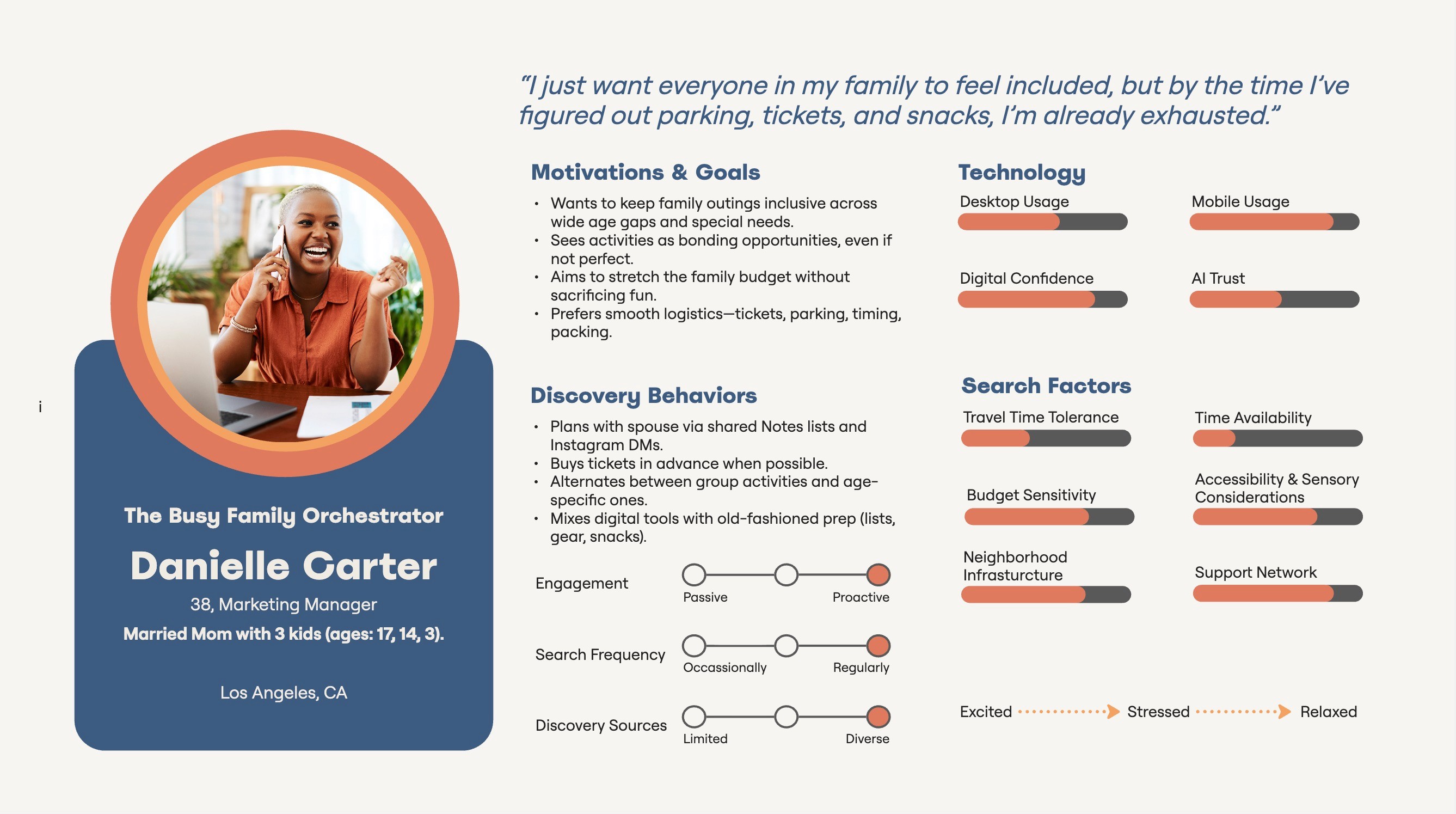
From interviews, screener survey data, and empathy mapping, I defined two personas. I chose to focus on Danielle Carter as the primary lens.
From interviews, screener survey data, and empathy mapping, I defined two personas. I chose to focus on Danielle Carter as the primary lens.
Danielle represents partnered parents managing multiple children with different needs. She’s driven to create meaningful family memories, but planning often becomes stressful due to logistics, cost, and uncertainty about whether an activity will work for everyone.
user journey
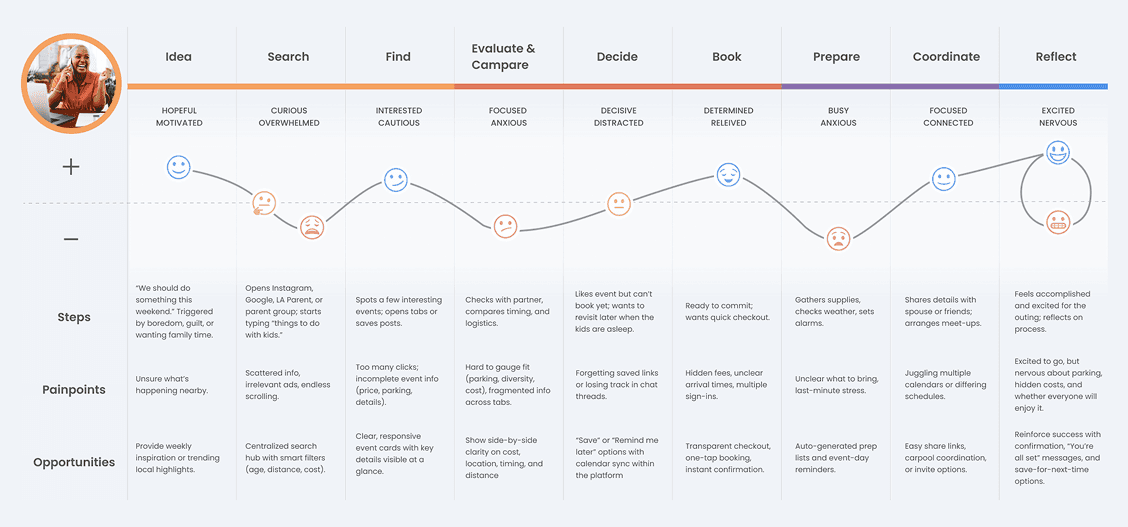
I mapped the journey for the Danielle Carter persona because she represents the most complex planning needs. If the solution works for her, it will naturally support a wider range of caregivers.
Insights
Early excitement drops fast once logistics get involved
Cost, distance, and timing often block decisions even when interest is strong
Booking brings relief, but parents still doubt whether they made the right call
How might we help LA county parents easily discover and plan affordable, age-appropriate activities that fit their needs, while reducing the stress, logistics, and mental load that make family outings challenging?
How might we help LA county parents easily discover and plan affordable, age-appropriate activities that fit their needs, while reducing the stress, logistics, and mental load that make family outings challenging?
Research made it clear why planning feels harder than it should. Parents are juggling outdated listings, missing details, too many tabs, and not enough confidence that everything will work for their family. To translate those needs into early design direction, I focused on four priorities:
A web app for easy access anywhere
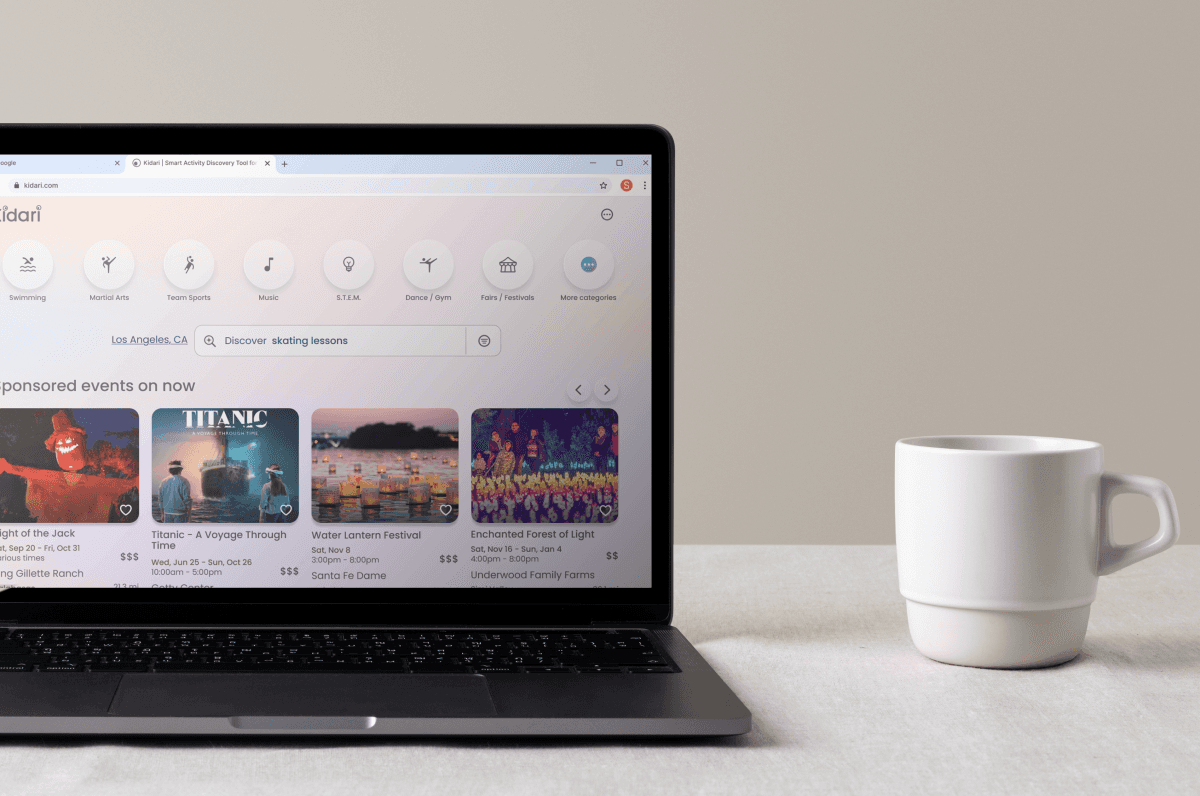
Parents search on their phones during life moments and on desktop at work, so the experience had to work seamlessly across devices.
"I don't want another app!"

K. Dover
K. Dover
Single mother of 2
Kids ages: 11 & 13

Smarter filtering
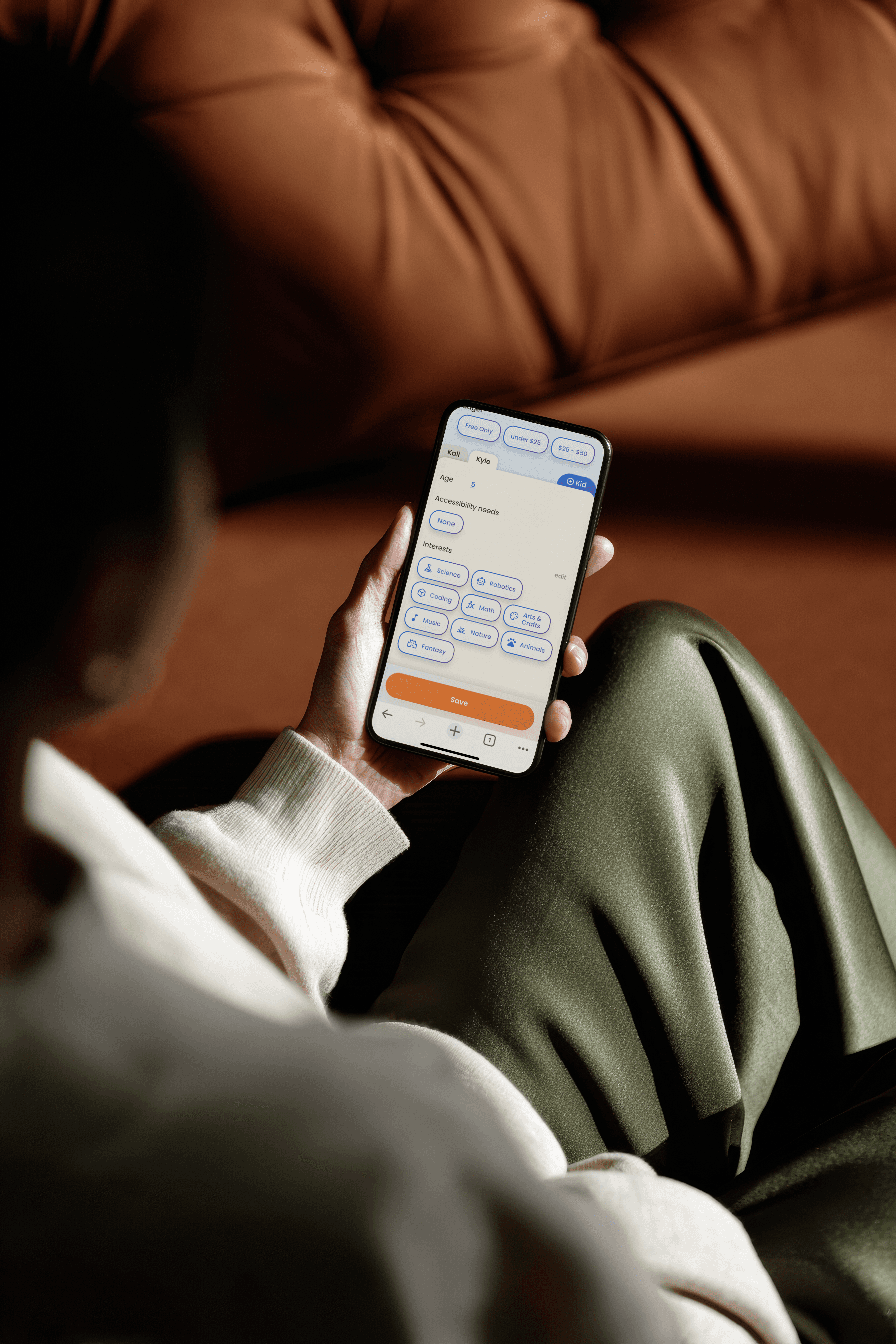
Age and date alone are not enough. Parents need to filter by cost, distance, interests, accessibility, and other real constraints.
Clear logistics
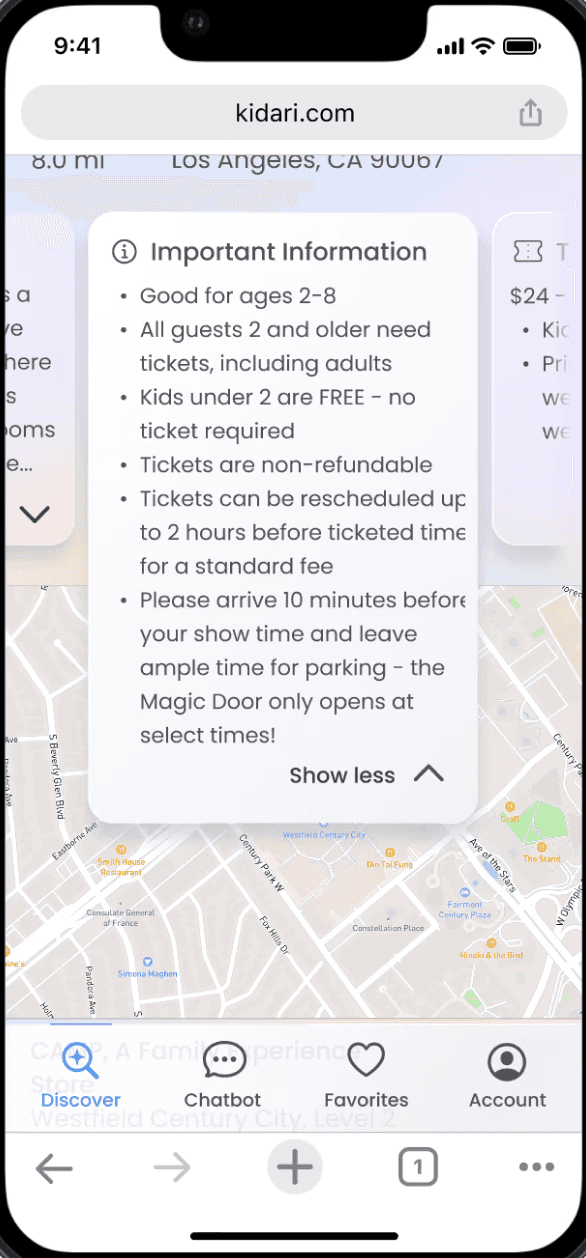
Parking, hidden fees, crowd level, arrival timing. The details that make or break the day must be upfront and easy to scan.
Personalization with control
Relevant suggestions on the home screen and a helpful chat assistant surface tailored options while giving parents full control over what they see and how they plan.
Ideate
The MVP
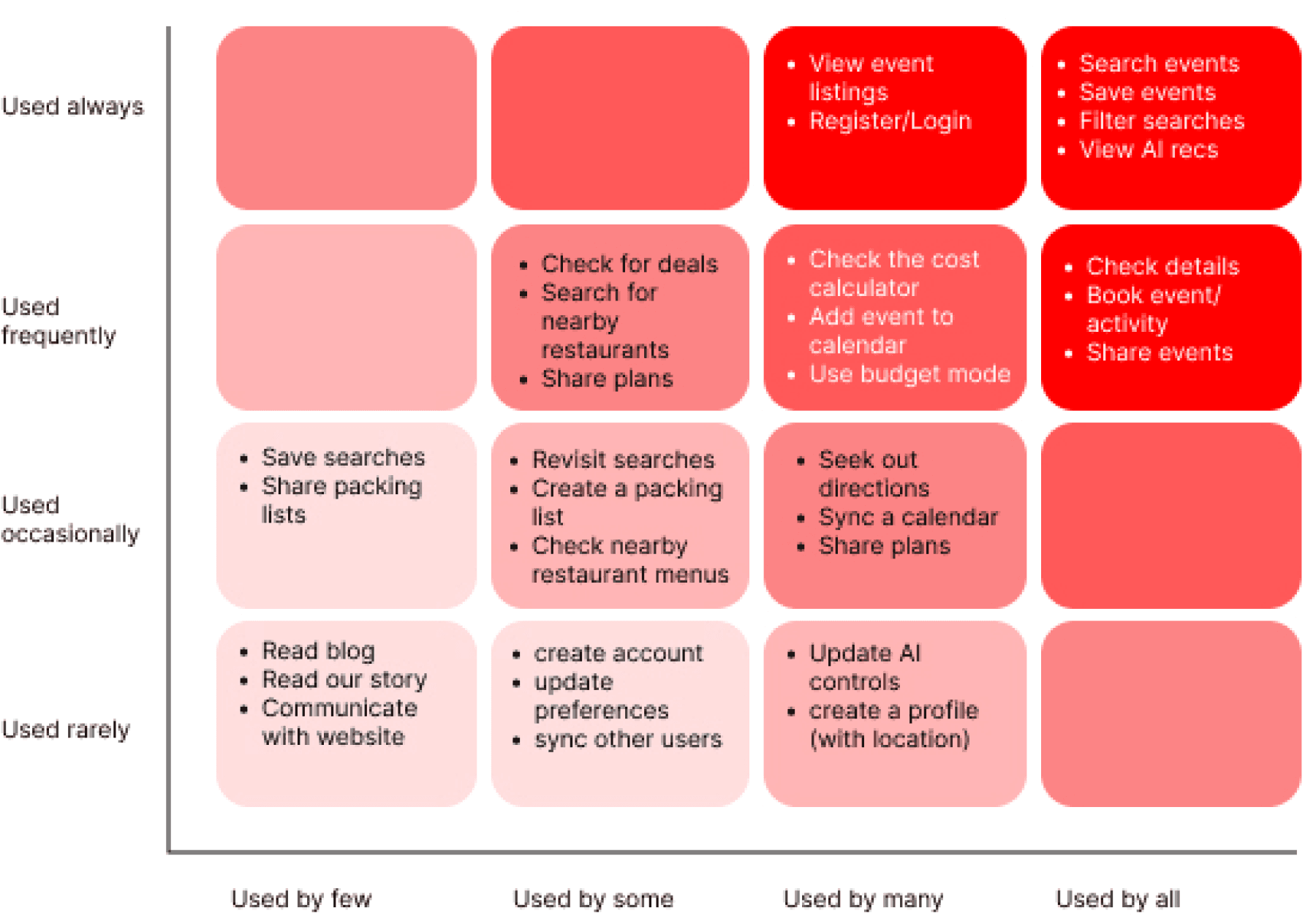
To define the MVP, I turned research insights into user stories and used red route analysis to identify the core tasks the platform must support.
To define the MVP, I turned research insights into user stories and used red route analysis to identify the core tasks the platform must support.
Red Route Analysis
Red Route Analysis
1.
2.
3.
4.
5.
6.
7.
1.
2.
3.
4.
5.
6.
7.
Onboarding the user to gain personal information to be able to tailor the webapp to them.
Searching for activities/events.
Being able to filter searches.
Getting personalized event listings based on the kid’s needs, interest, and parent preferences.
Having the ability to save and share an event and come back to it later to reduce mental load.
Being able to view details and logistics.
Booking an activity/event
IA & user flows
Before mapping detailed interactions, I created a sitemap to establish the structure of the platform and ensure the most essential tasks were surfaced in the navigation.
Exploring the Search feature
Exploring the Search feature
An important red-route in my design is the Search feature, which allows parents to browse activities instantly or quickly unlock personalized recommendations after creating a profile.
Search for an event/activity
Search for an event/activity
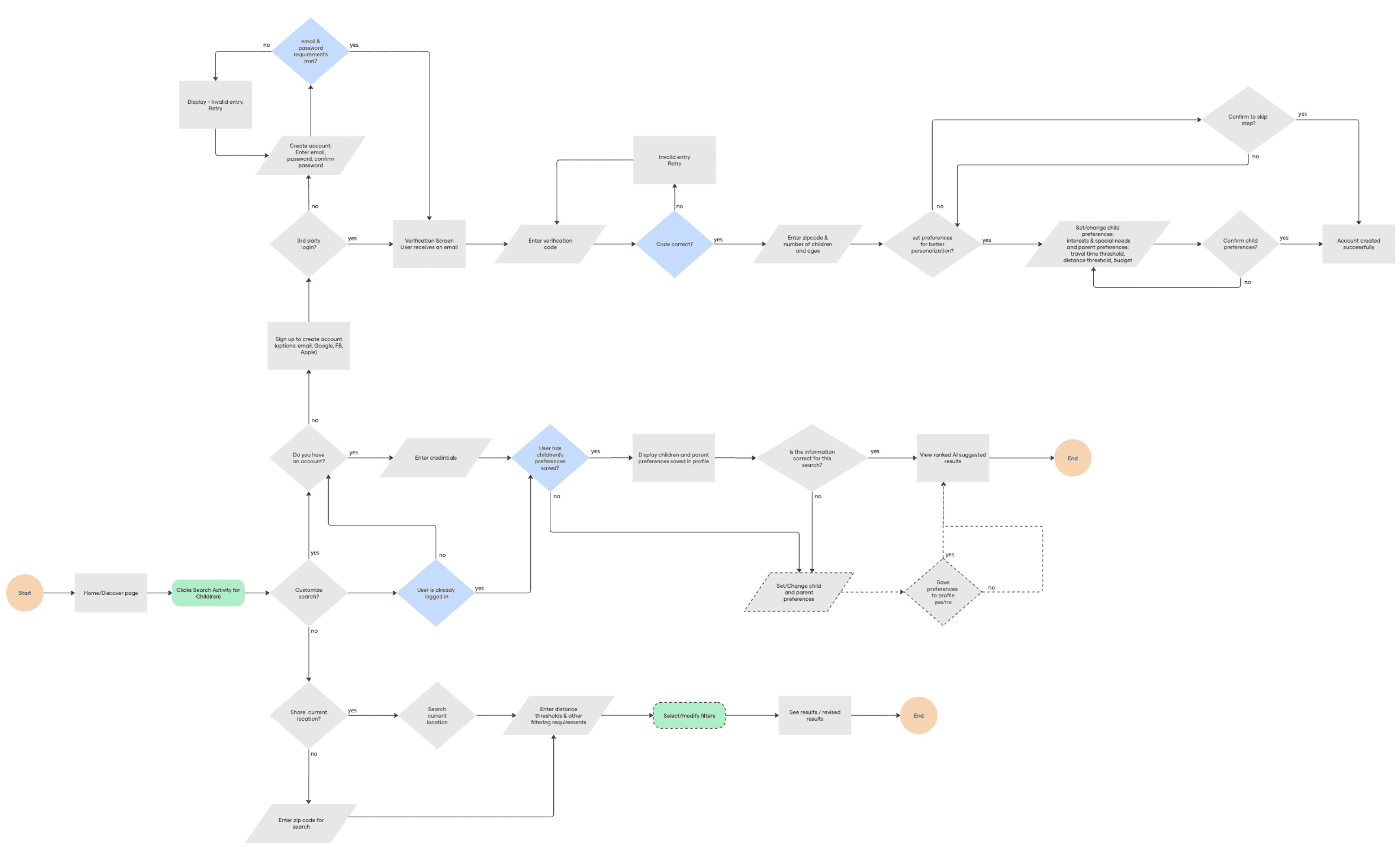
Users can search with or without an account, but the paths differ, so I created two separate flows to reflect each experience.
Onboard a new user
Onboard a new user
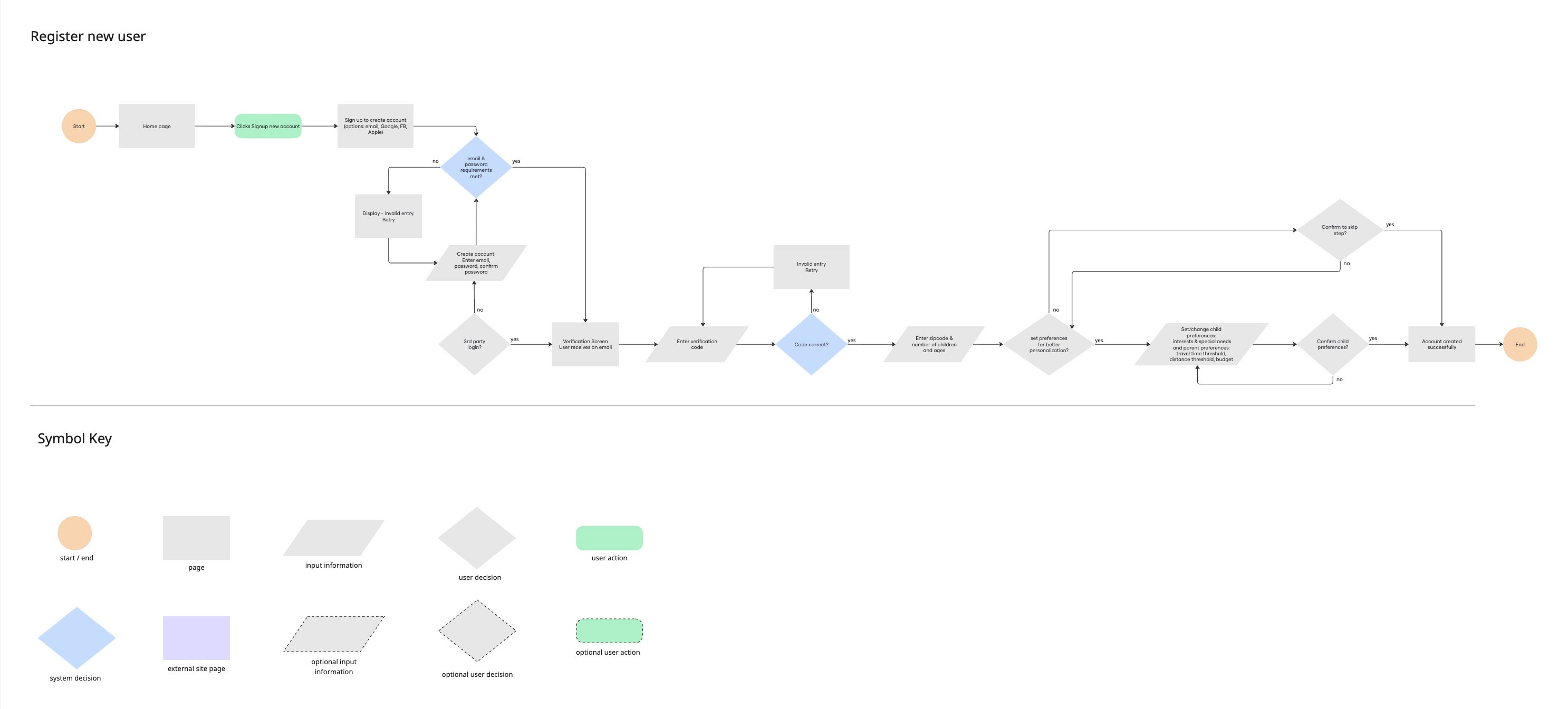
Search for an activity with account
Search for an activity with account
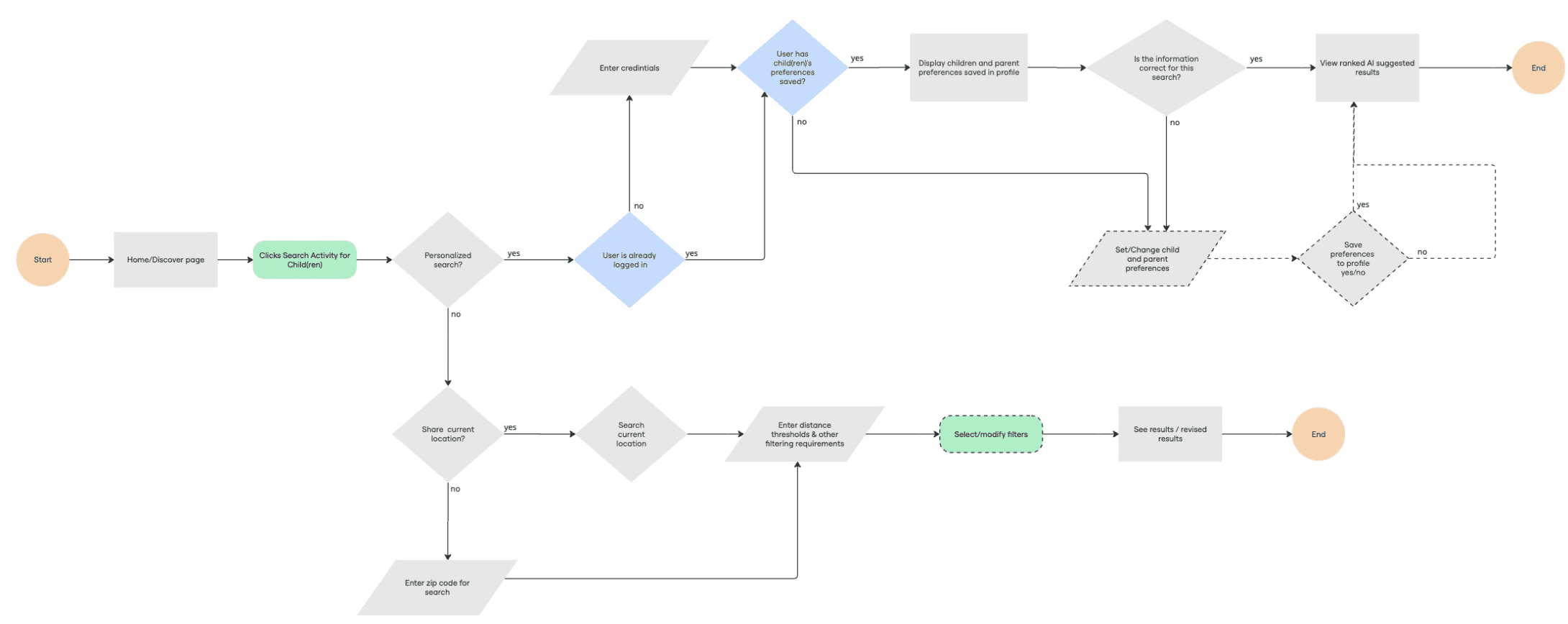
Ideation
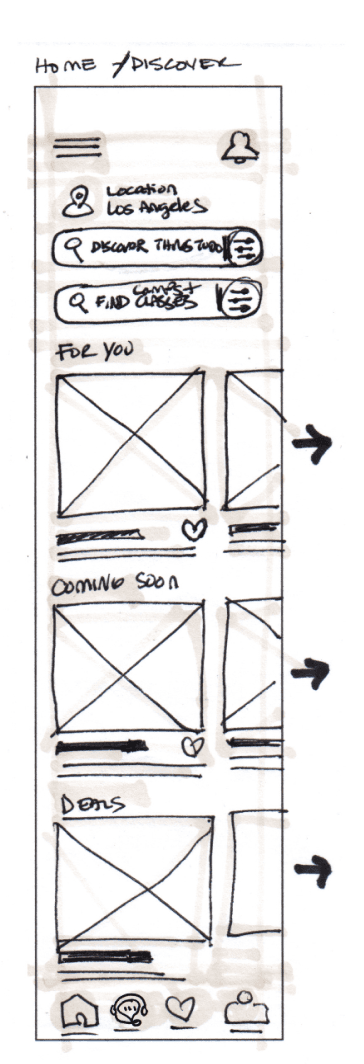
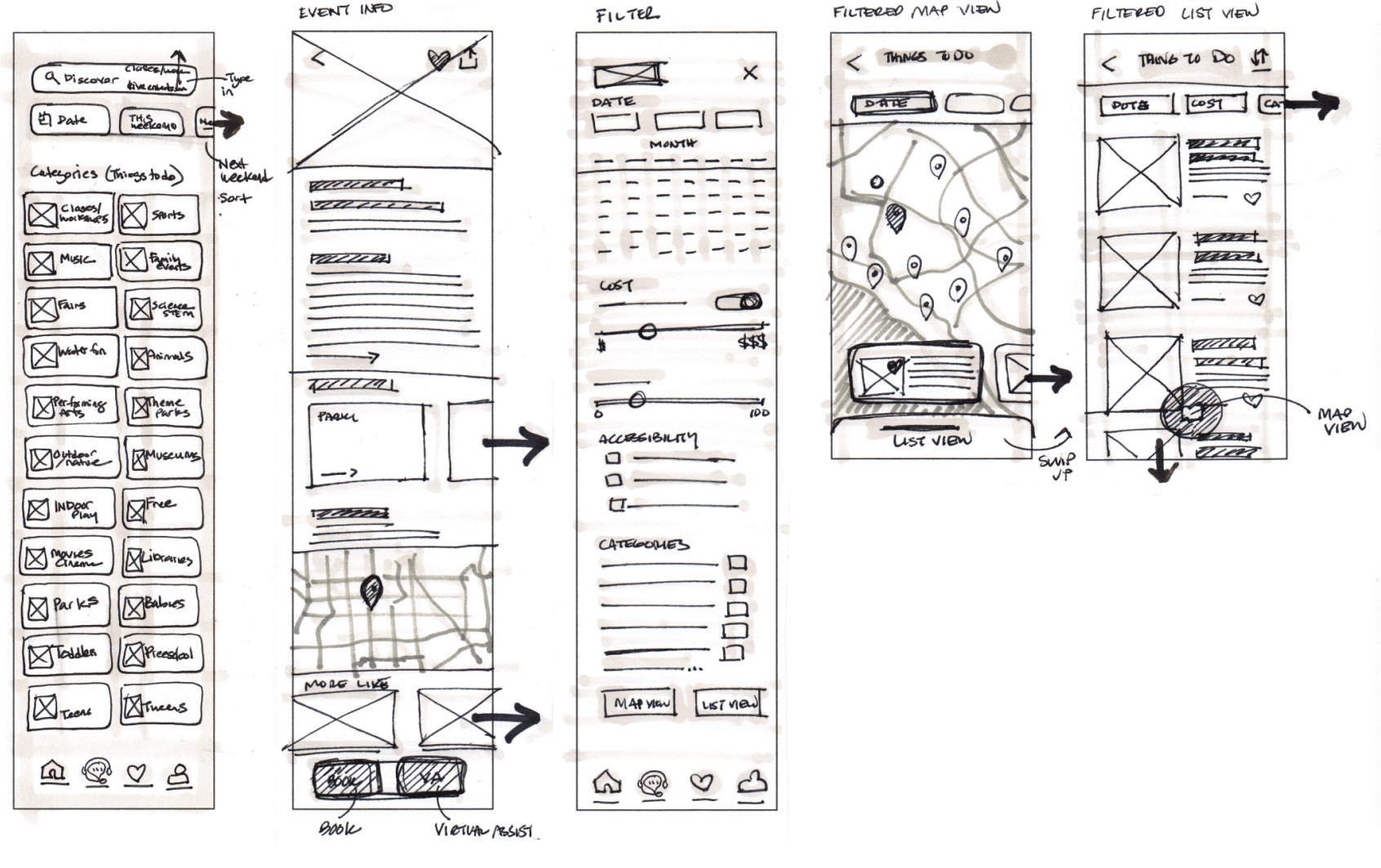
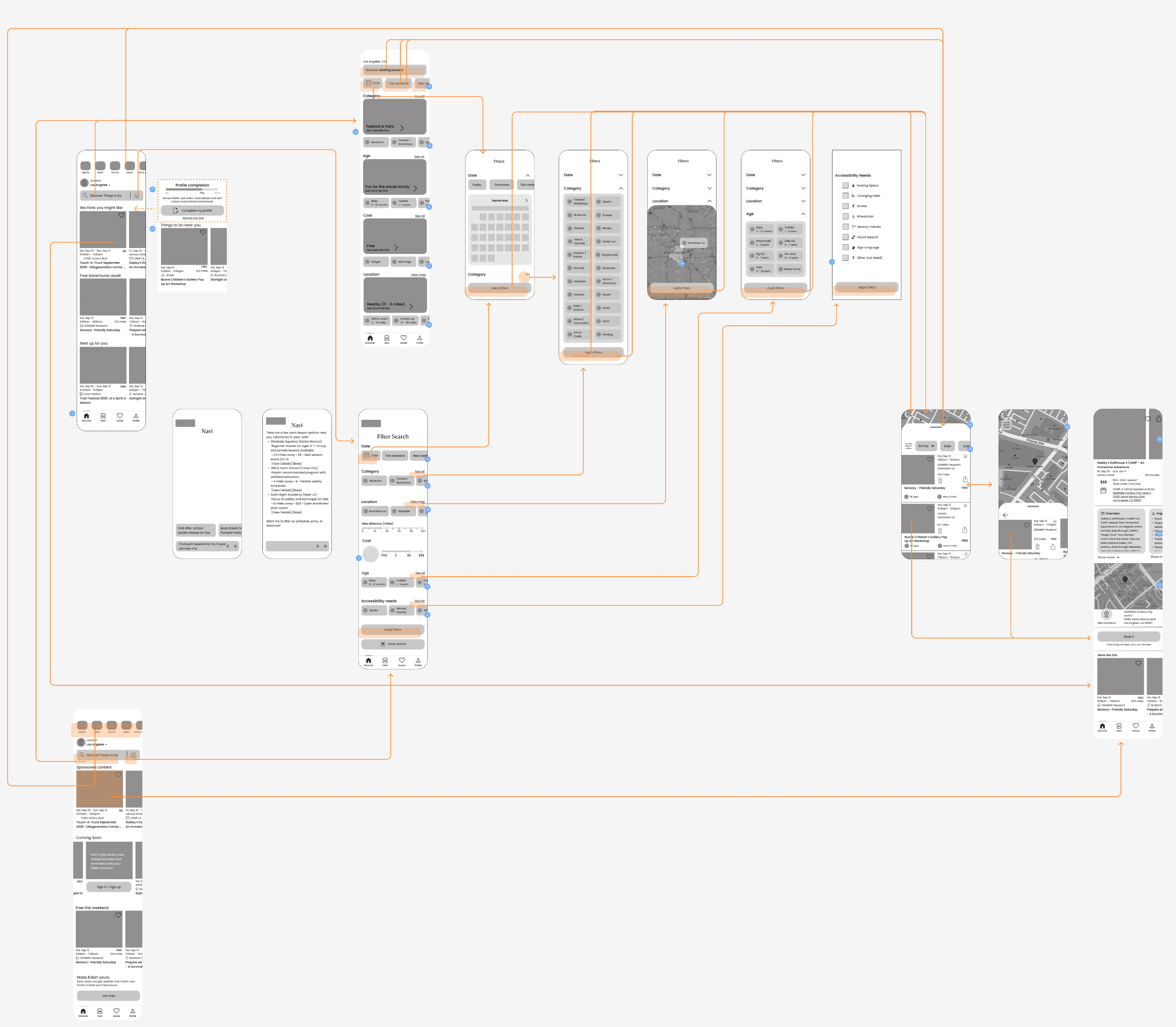
After mapping the core red-route flows, I translated sketches into wireframes and built wireflows to quickly validate usability through early guerrilla testing.
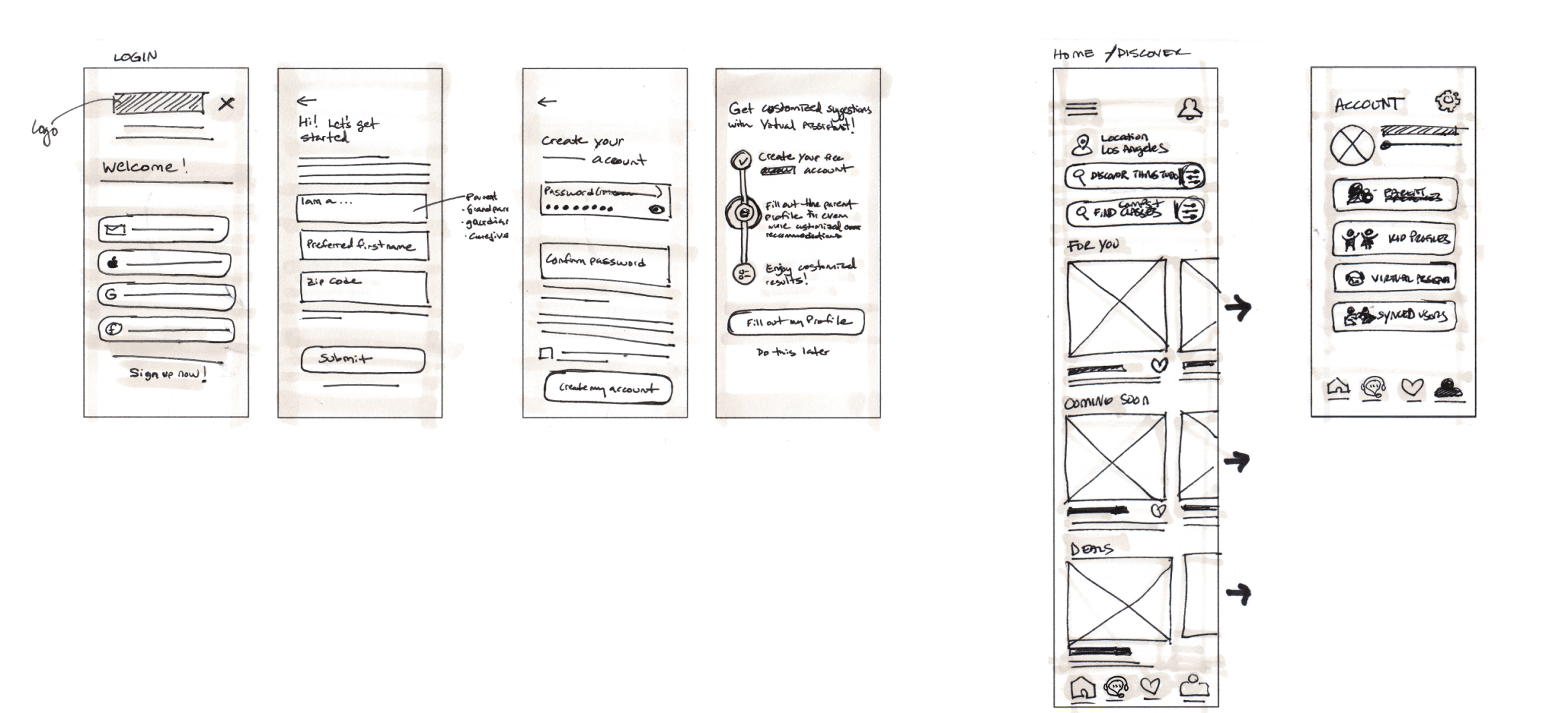
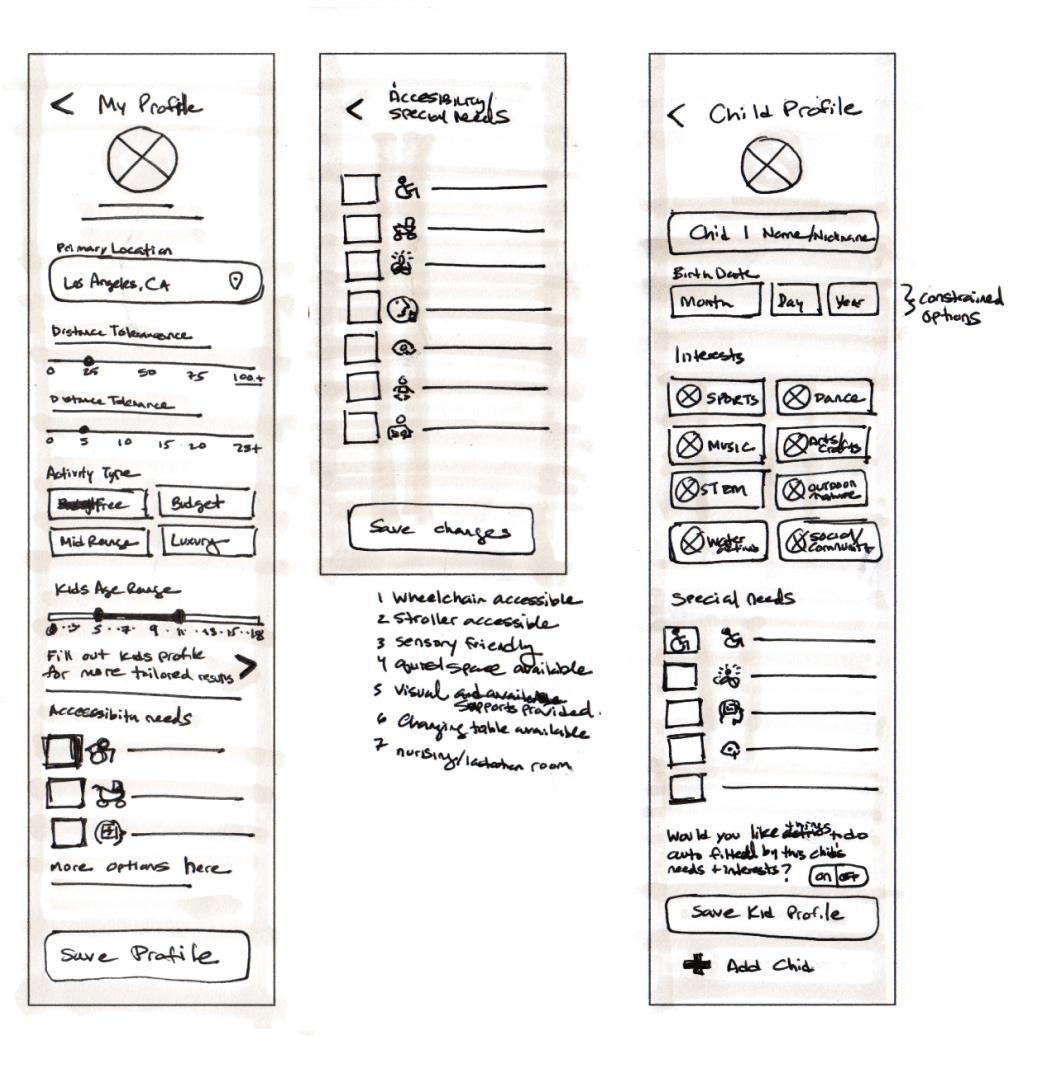
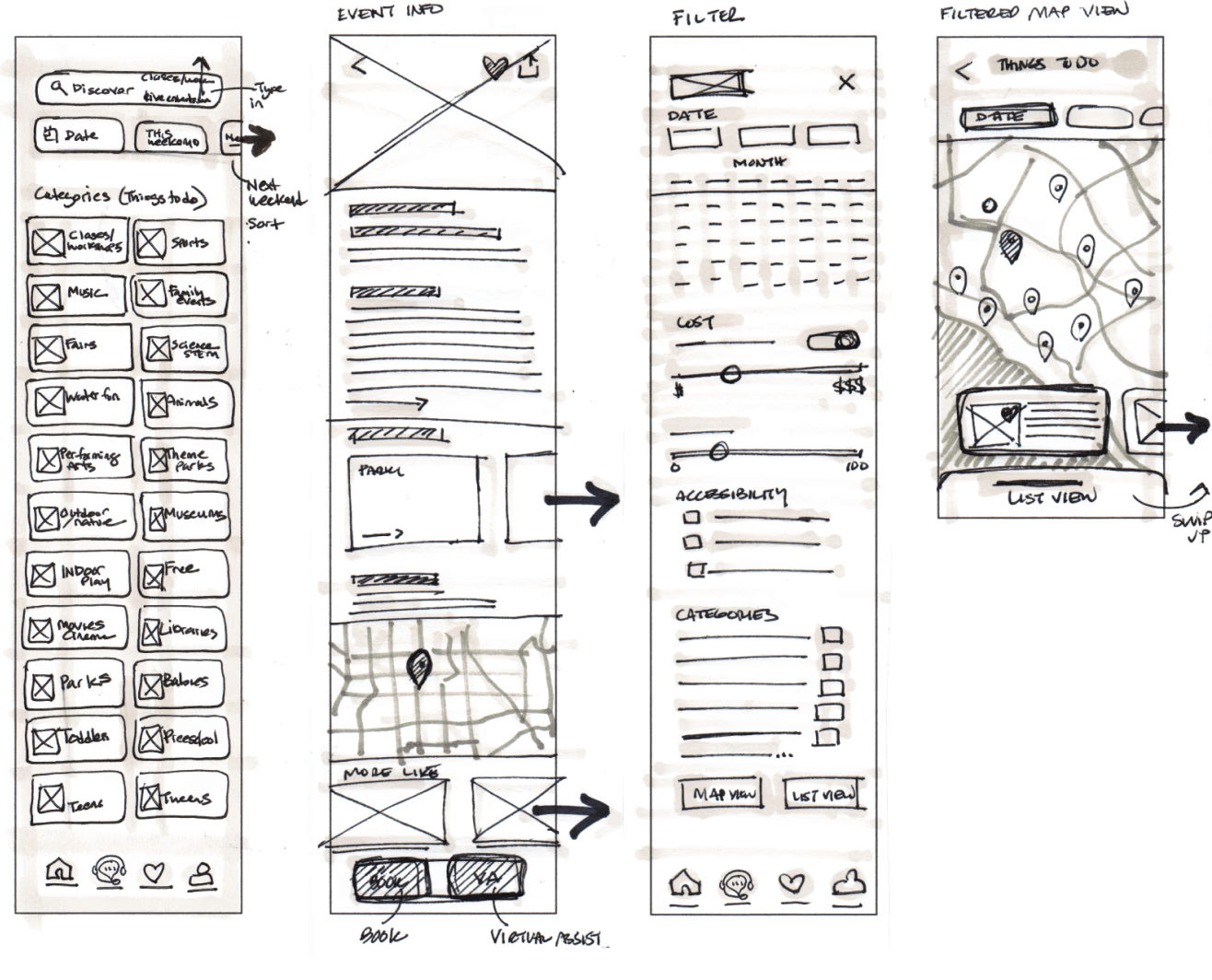
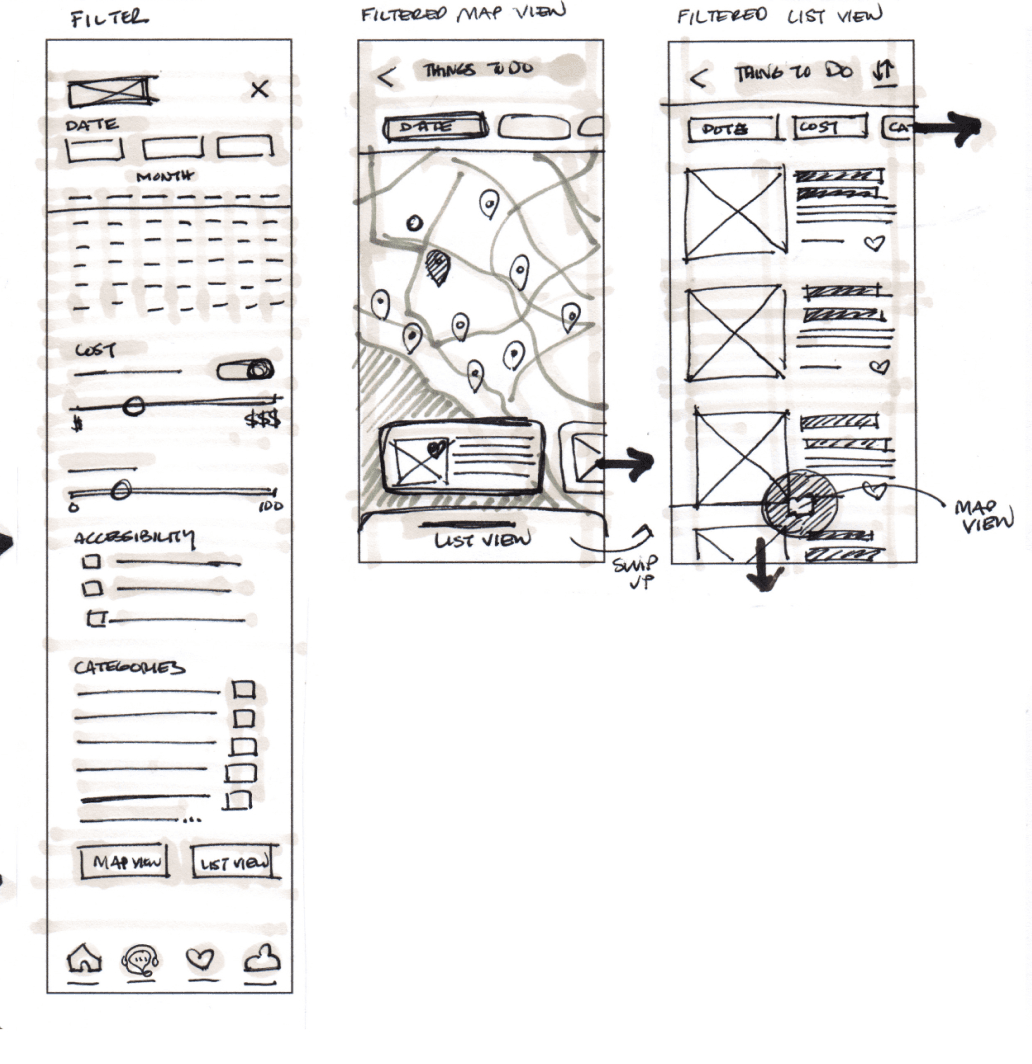
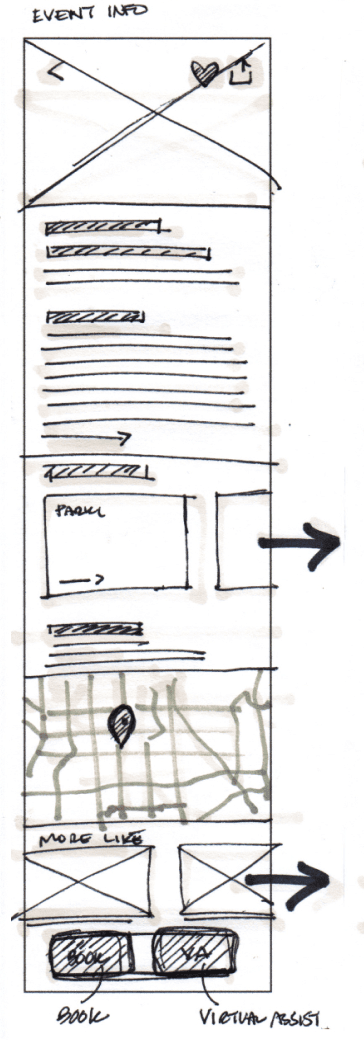
Onboard a new user
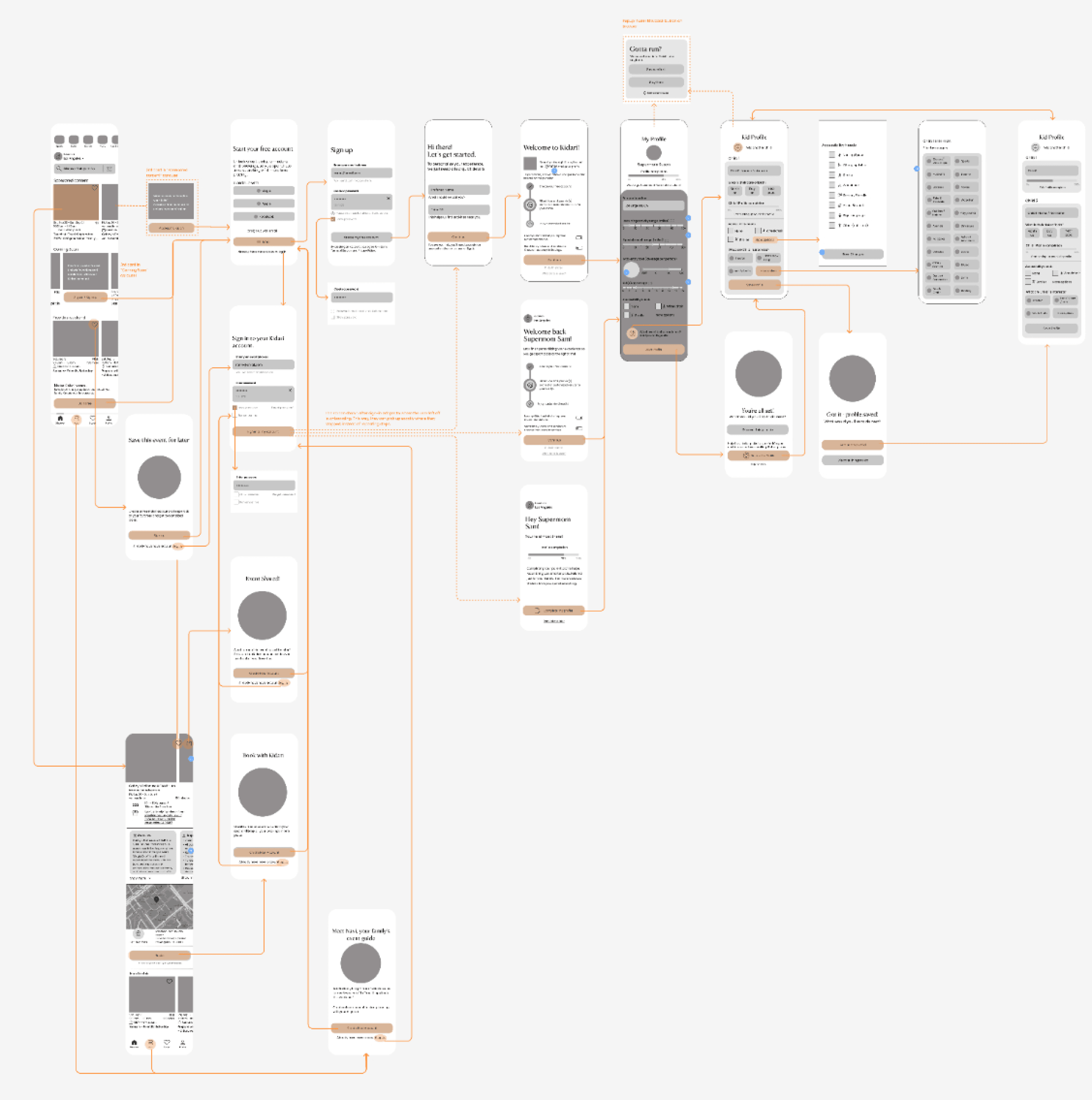
Search for an event/activity with account
Prototype
UI Design
A mood board and UI guidelines helped translate the concept into a cohesive visual system, which informed the high-fidelity screens and interactive prototype.
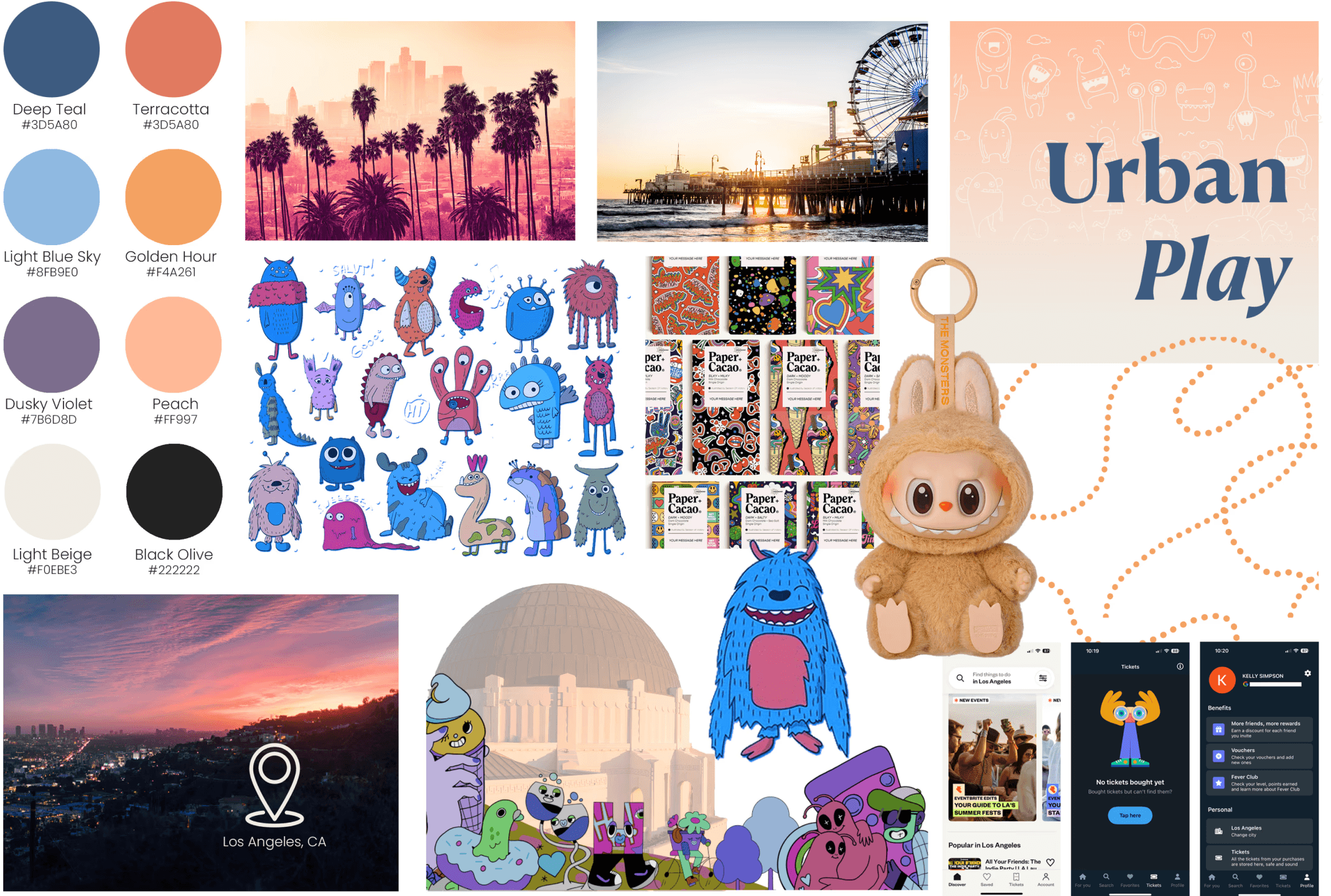
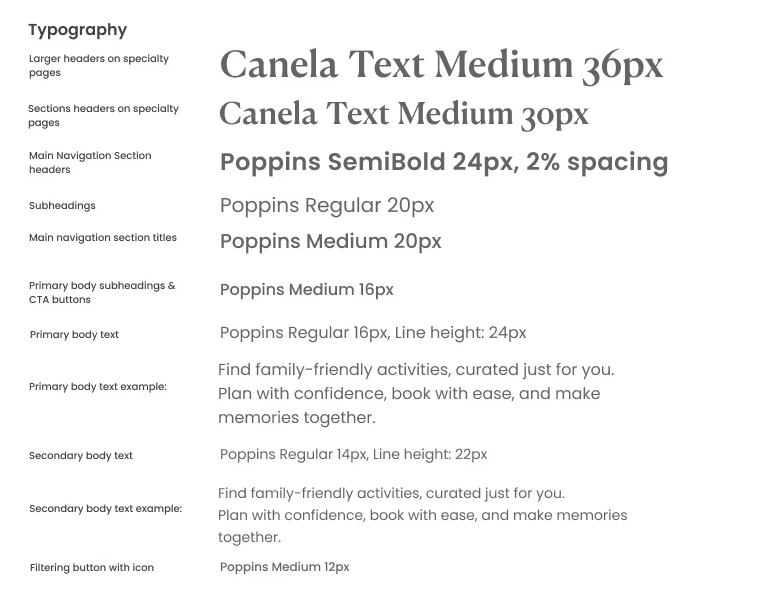
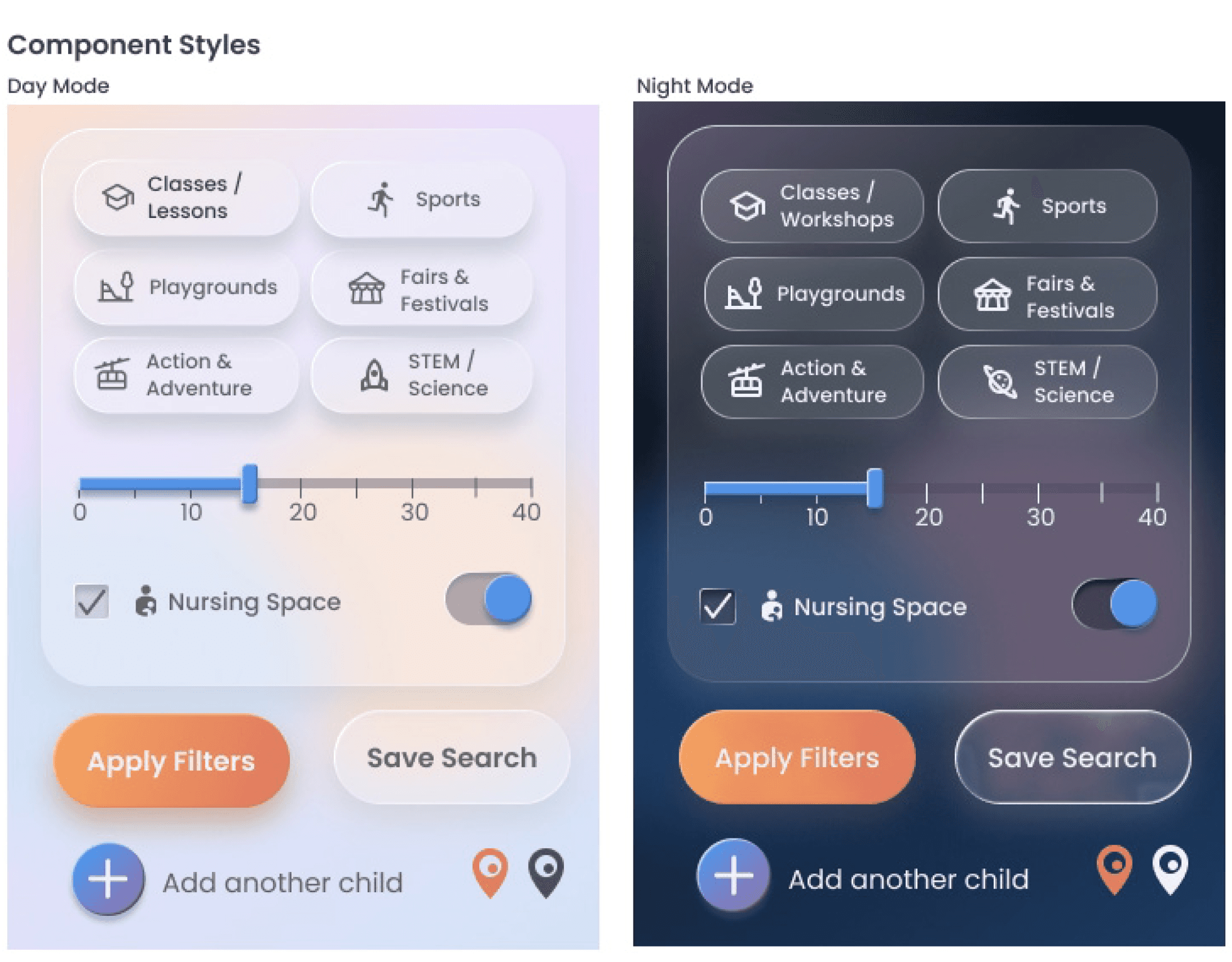
I designed a UI system inspired by the energy and colors of Los Angeles to create a joyful, low-stress planning experience.
Soft gradients, rounded components, and light dimensionality make the interface feel friendly, tactile, and full of discovery as parents explore what the city has to offer for their families.
high fidelity screens
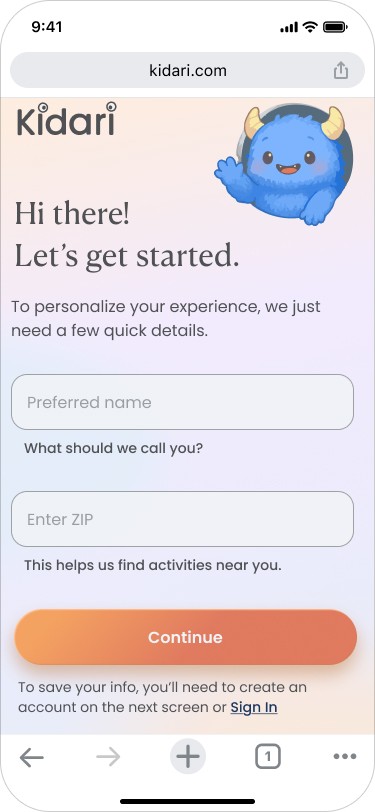
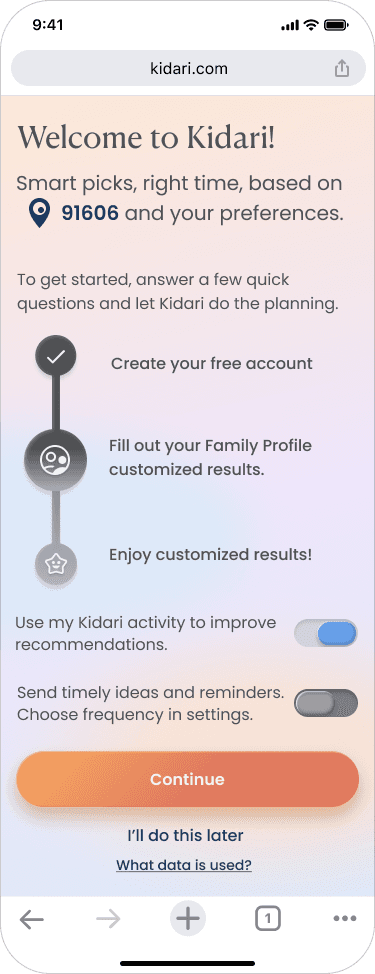
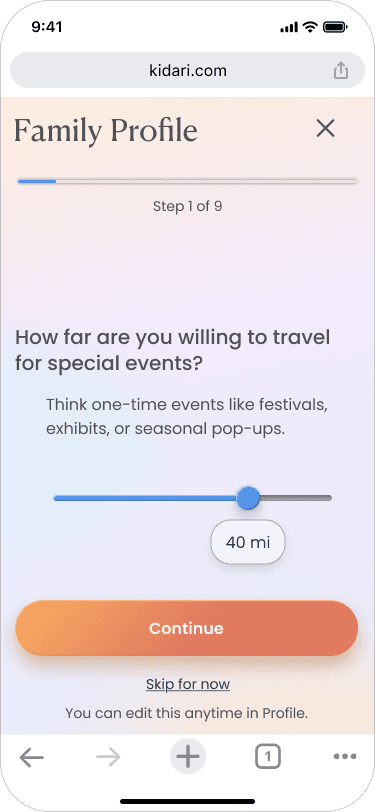
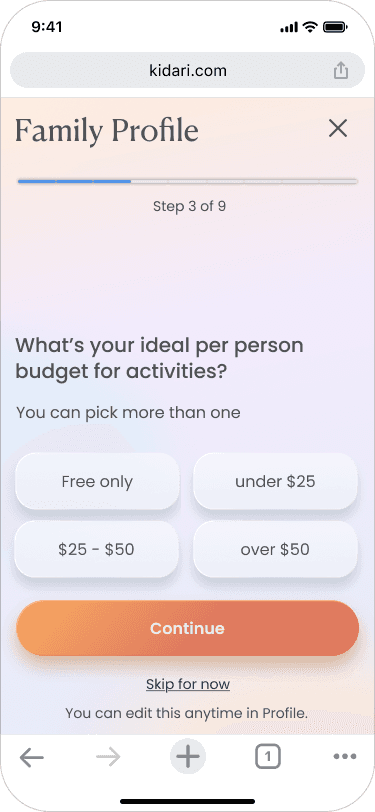
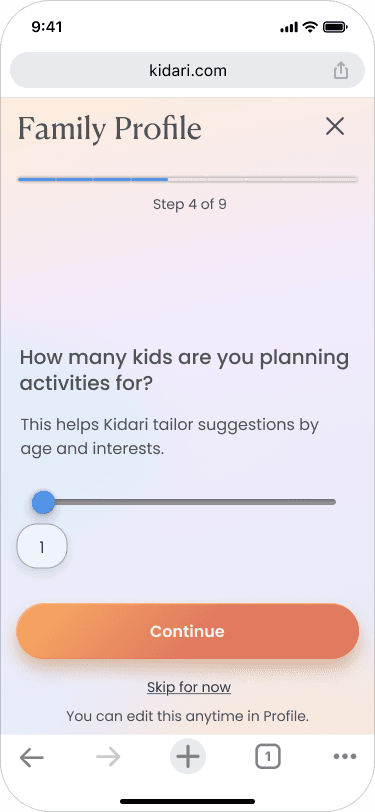
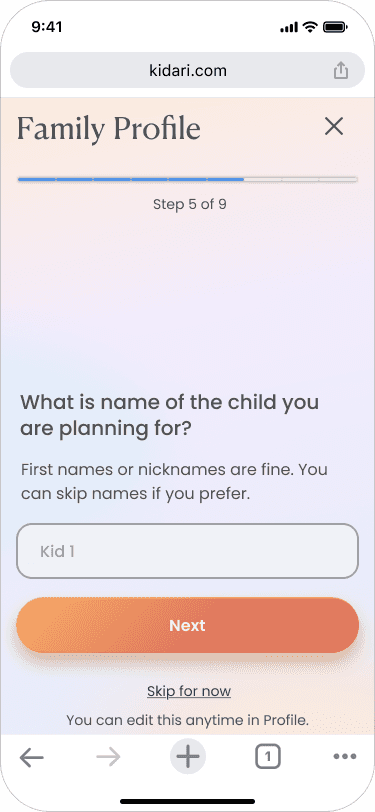
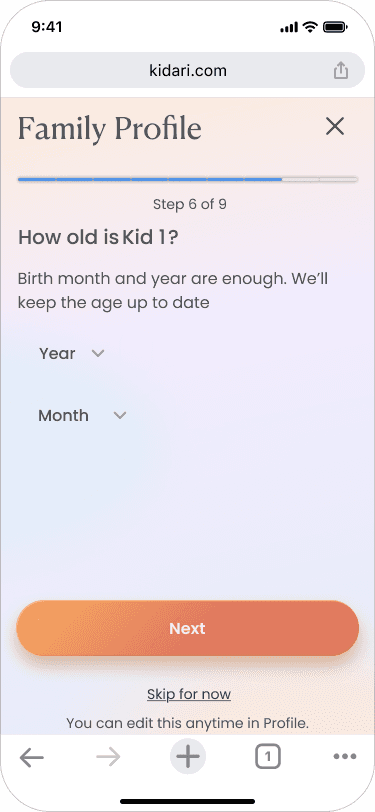
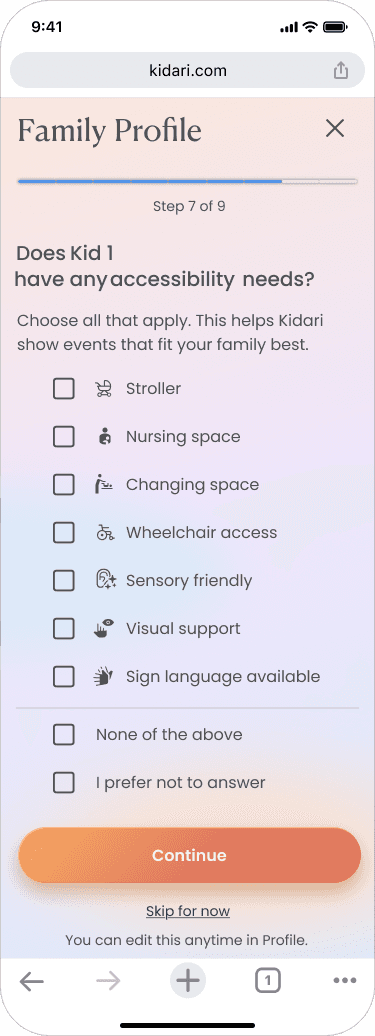
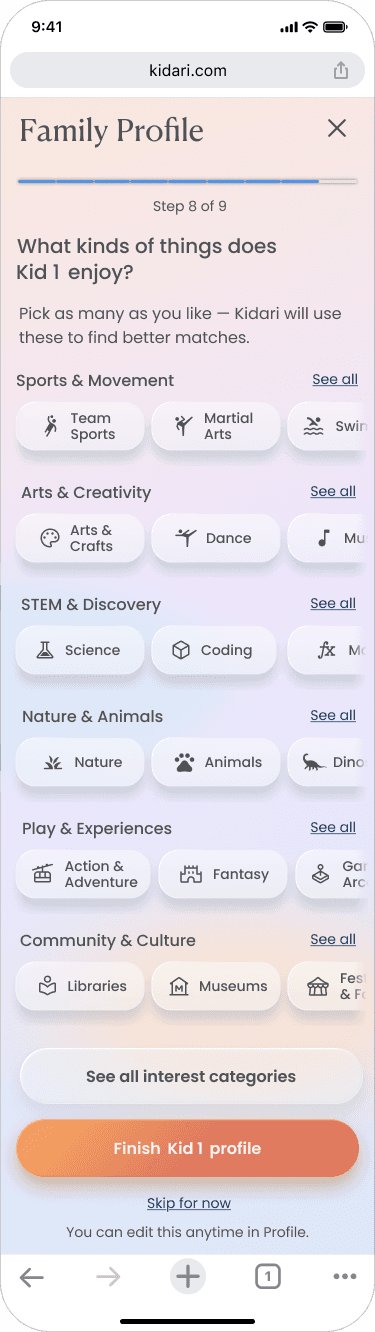
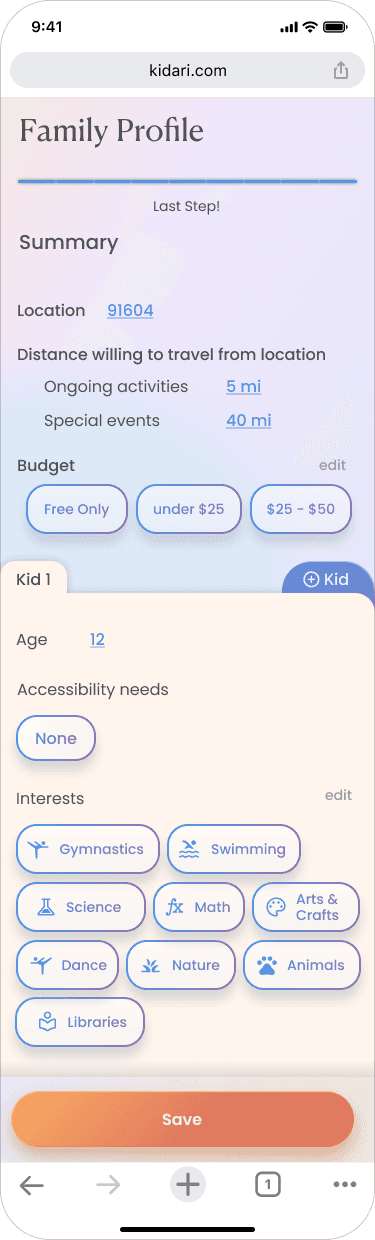
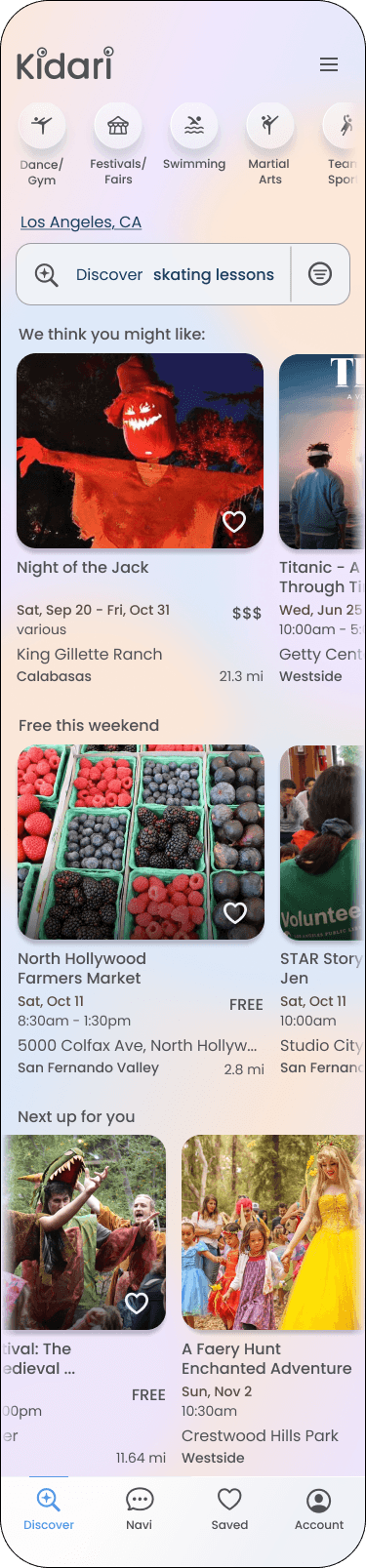
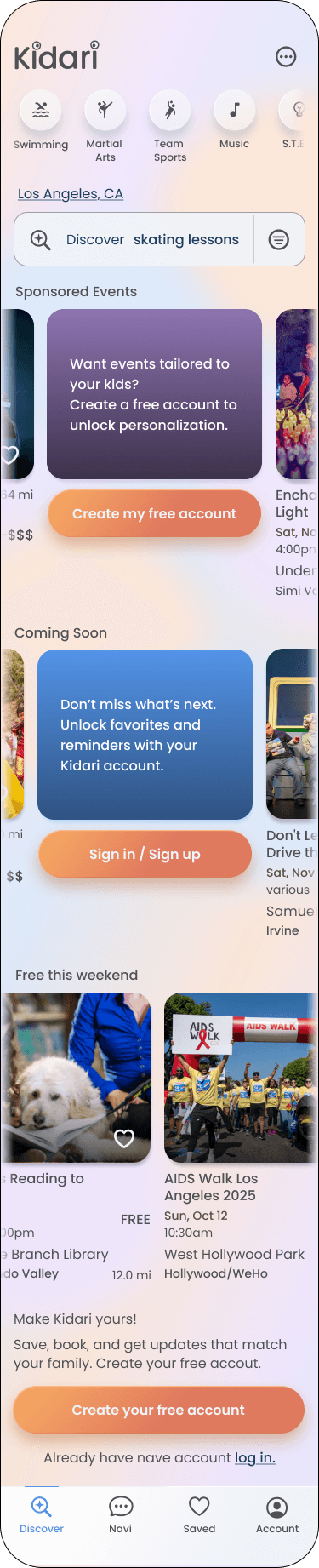
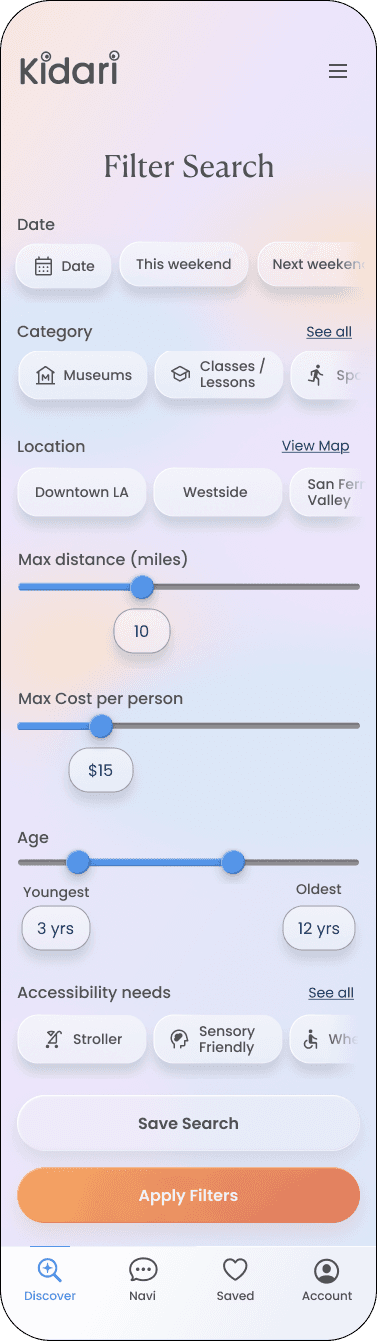
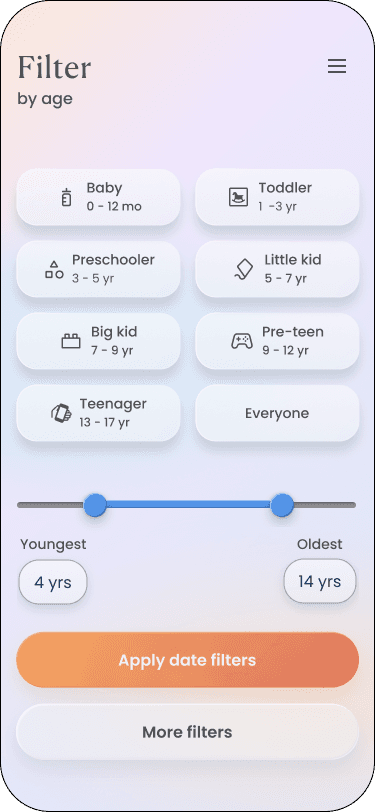
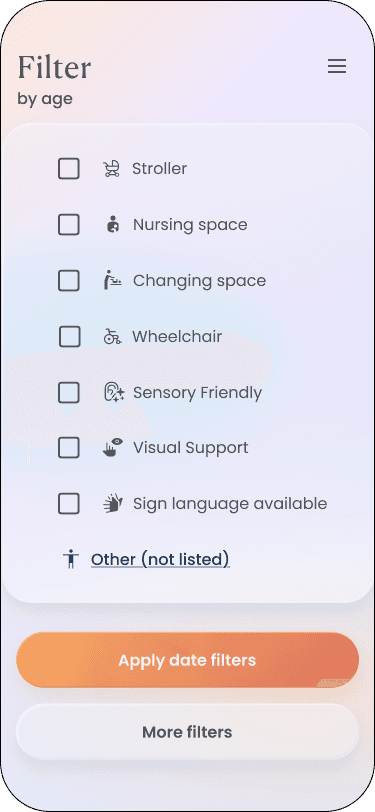
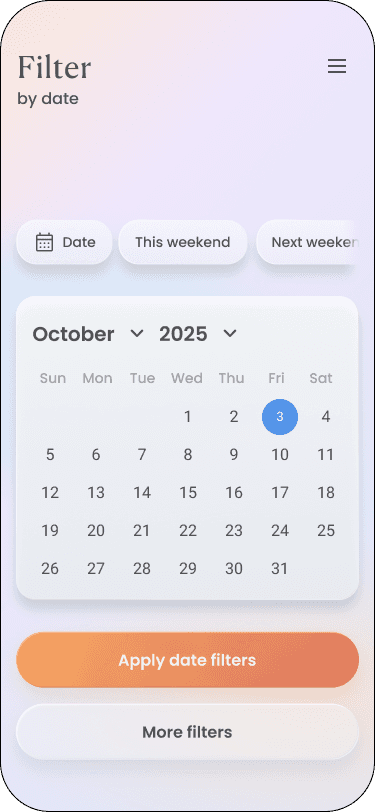
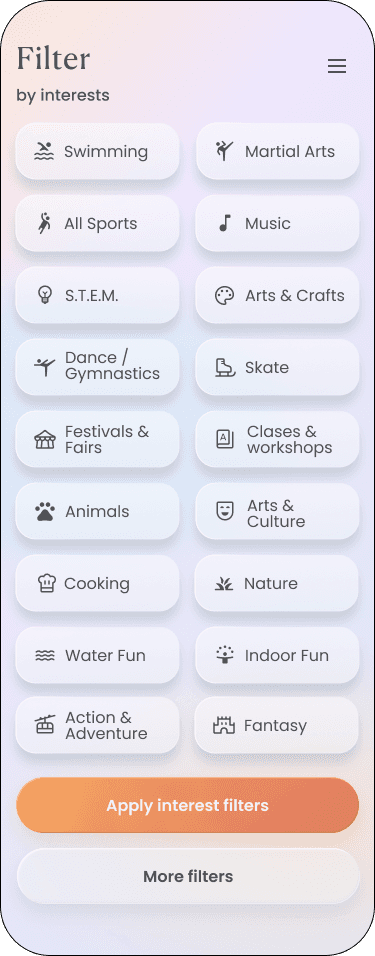
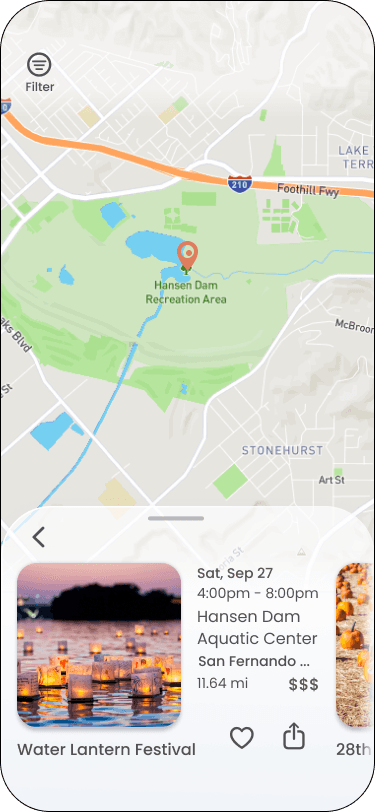
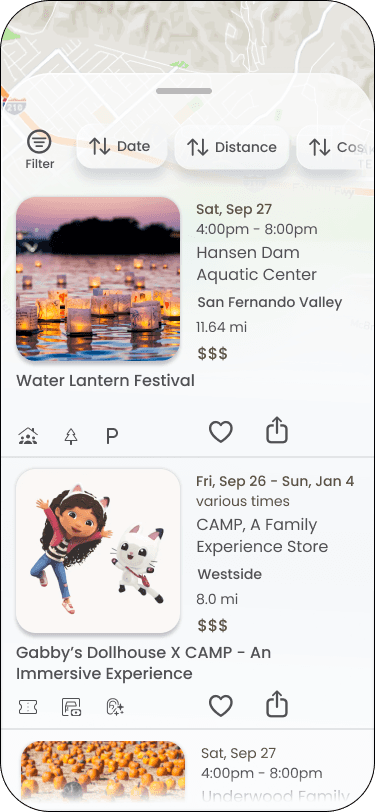
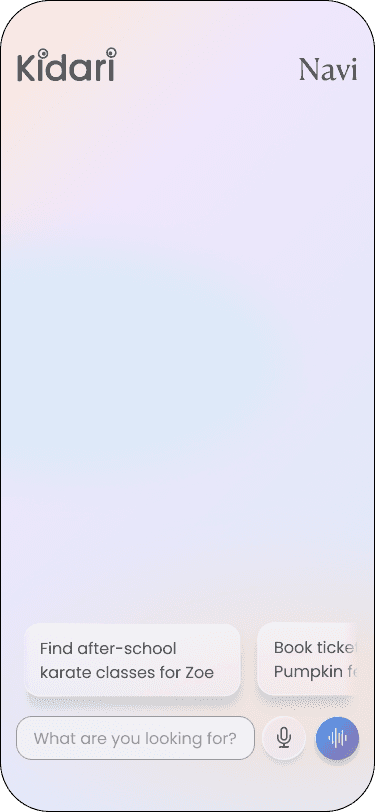
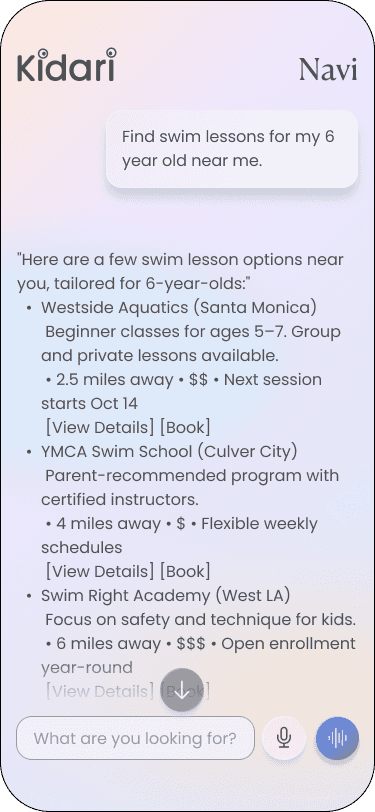
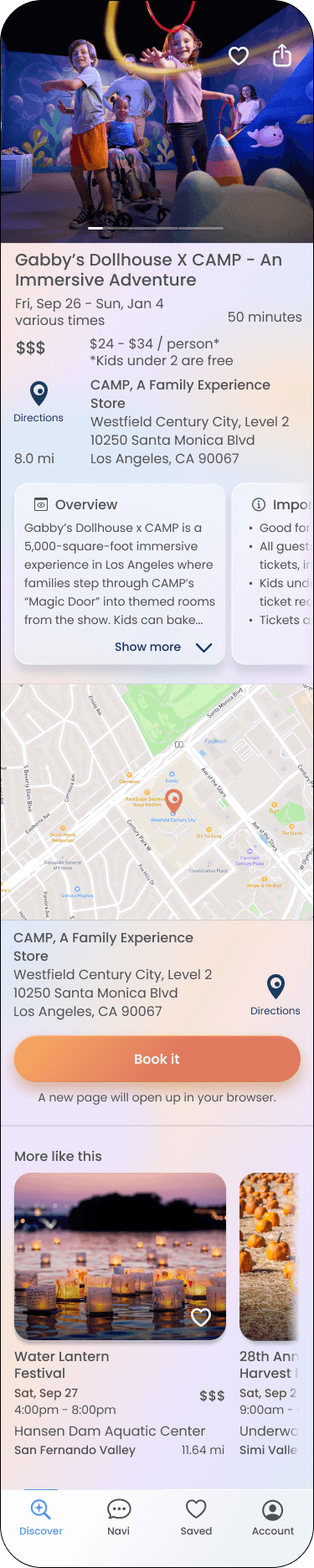
The final UI reflects two rounds of iteration and focuses on speed, clarity, and user confidence.
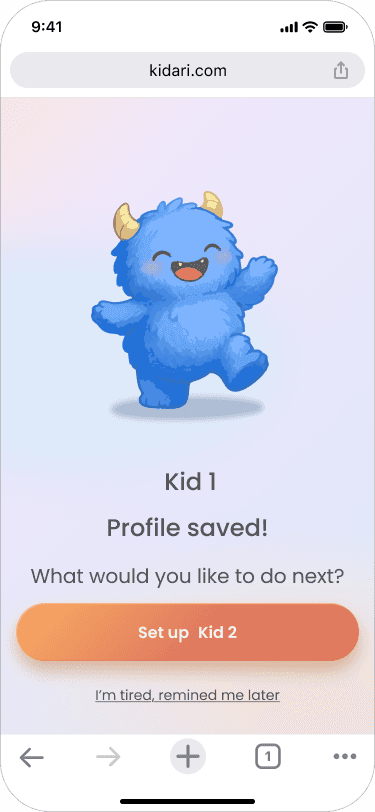
Search and booking flows are optimized for quick action, while onboarding is now a short guided setup that unlocks personalized results without slowing parents down. Accessibility standards, intuitive navigation, and clear next steps shaped the final designs for the two core journeys: onboarding and finding an activity.
Onboard a new user

2. Search for an event/activity with account
empty state screens
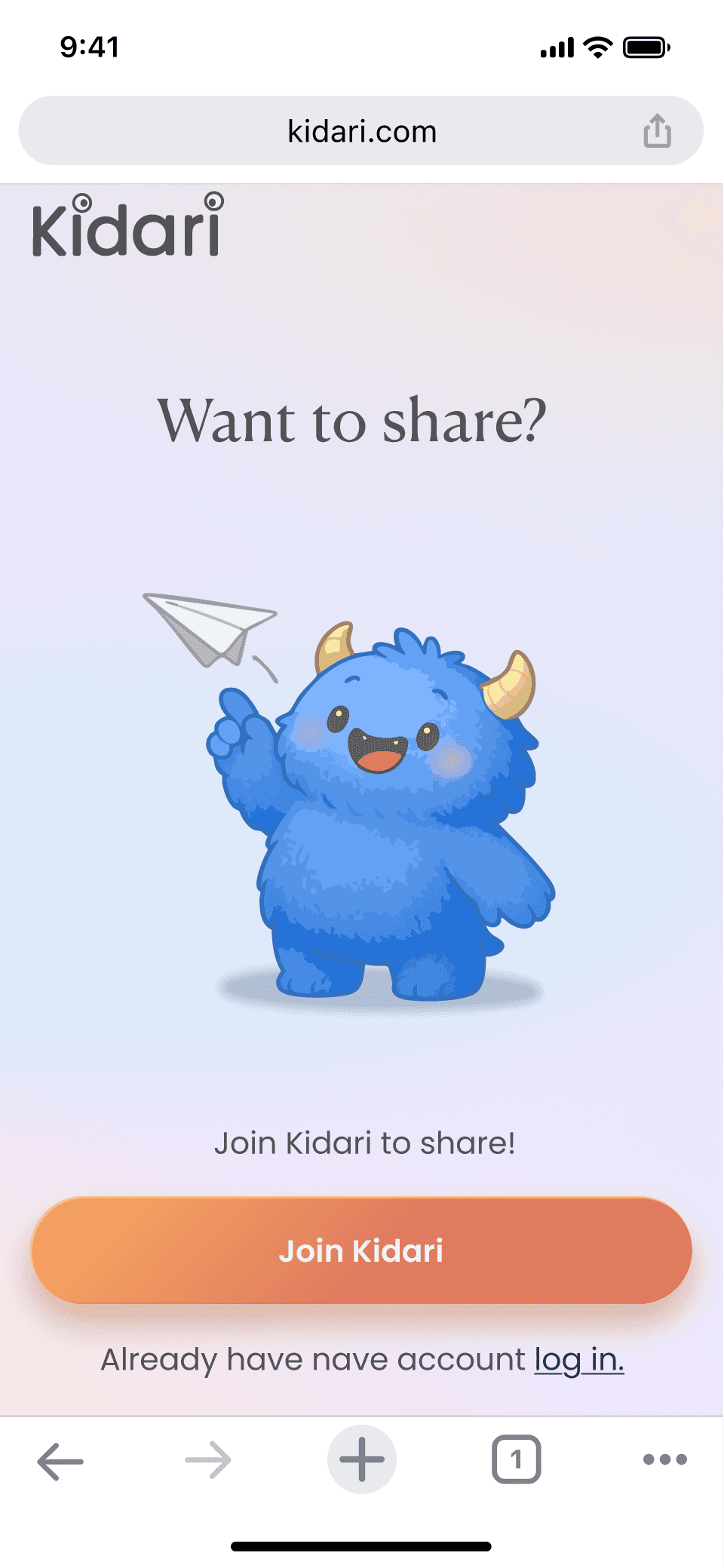
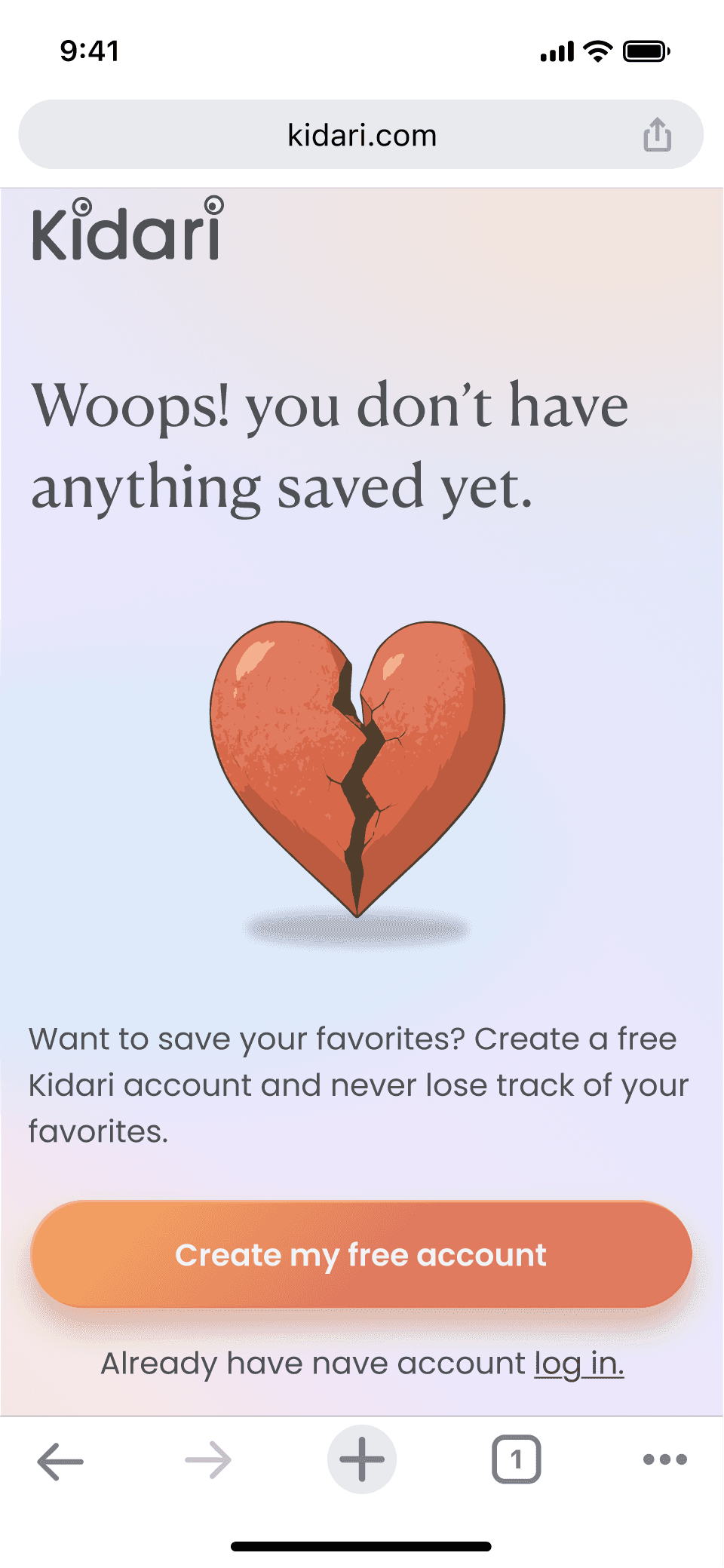
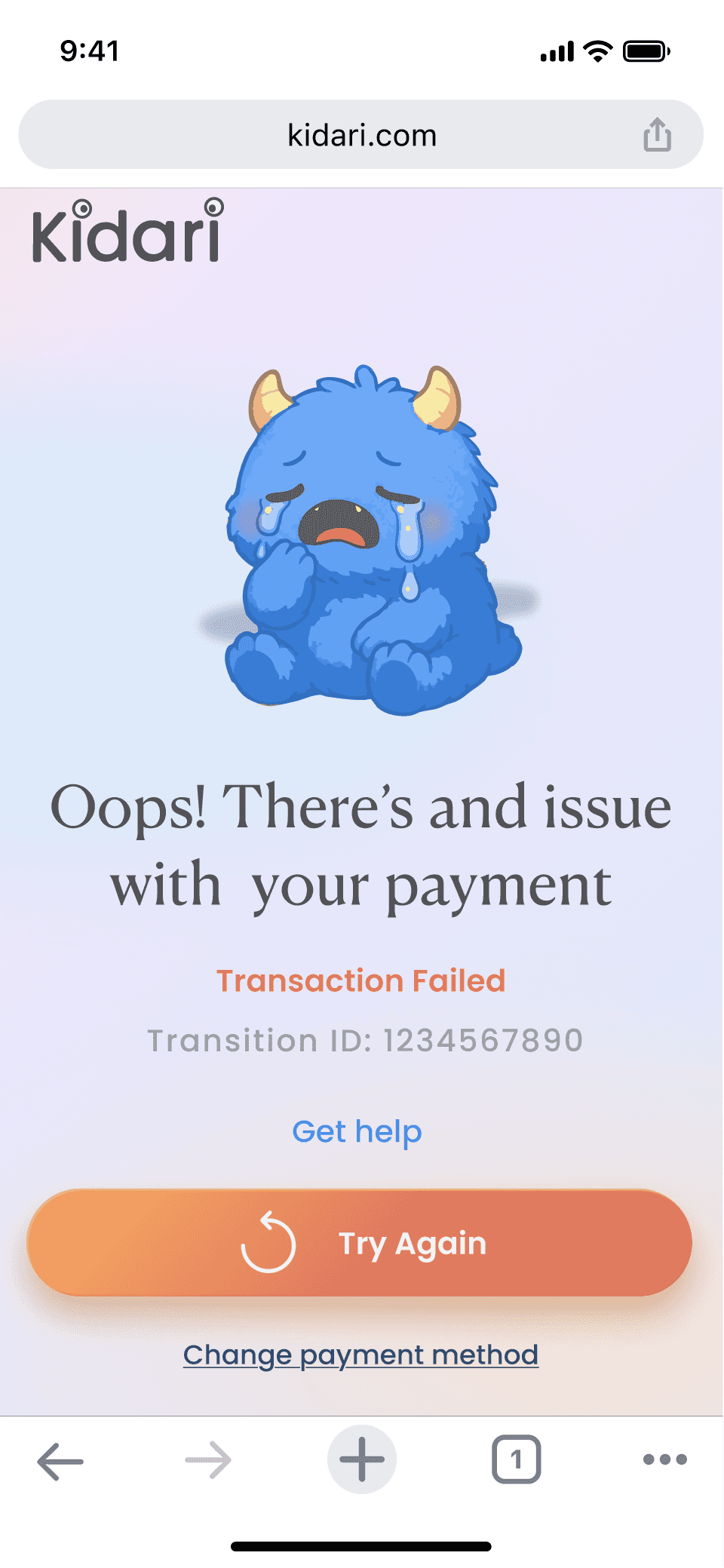
I designed targeted empty states to guide users when they reach a dead end, such as saving or booking without an account or entering incorrect payment details. Each screen uses clear messaging and the friendly monster character or graphic illustration to nudge users toward the next action, reducing frustration and keeping progress moving.
Test
Usability testing
Goal: To confirm whether Kidari supports fast decision making and builds trust early in the experience.
I conducted nine moderated remote usability sessions with parents of children ages 1 to 14 in Los Angeles County. Each session lasted approximately 20 to 40 minutes. The tests evaluated the clarity and efficiency of the onboarding, search, filtering, booking, and directions flows. Parents were asked to think aloud while completing tasks such as finding an event for a specific weekend and booking it.
Round 1 (D. James)

These sessions validated the core flows and highlighted opportunities to strengthen guidance and motivation.
Early findings showed strong desire to begin searching immediately, but confusion stemmed from unclear icons, redundant onboarding steps, and the lack of visibility into feature value before sign up. After refining the design, participants found search and filtering intuitive and appreciated preset prompts in the chat assistant. Account creation still needed a gentler transition and clearer incentives.
Results
7 of 9 parents tried to search before onboarding
5 of 5 parents understood the chat assistant after renaming it
5 of 5 parents did understand how to filter after revising the symbols
Usability gaps
Across both rounds of testing, patterns emerged that pointed to improvements still needed:
The value of creating an account must be more obvious up front
Map interactions should feel fully tappable and flexible
Button styles need clearer affordance to guide momentum
Filters work well but could show active selections more clearly
These usability gaps informed the final refinements and will continue to guide development priorities.
Round 2 (S. Jeudy)
looking ahead
The latest prototype has addressed the most critical blockers and improved confidence in the key flows. Next steps focus on refining sign-up incentives, strengthening visual cues for booking and payments, and making map and calendar tools feel more seamless. As Kidari moves toward a working beta, I will continue testing with LA families to ensure the experience stays simple, supportive, and grounded in how parents really plan.
Explore latest prototype here or watch me explore it below:
Latest Prototype
KIDARI
A smart activity discovery app for LA parents
duration
10 weeks
tools
Figma / Miro / Google forms / Google spreadsheets / Adobe Illustrator / Pen & Paper
my role
I led the UX process from research to testing, designing a tool that reduces planning stress and supports confident decisions for parents, grounded in real feedback.
KIDARI
A smart activity discovery app for LA parents
duration
10 weeks
tools
Figma / Miro / Google forms / Google spreadsheets / Adobe Illustrator / Pen & Paper
my role
I led the UX process from research to testing, designing a tool that reduces planning stress and supports confident decisions for parents, grounded in real feedback.
LA county is home to 873,000+ households with children under 18.
problem
LA parents feel overwhelmed by the mental load of finding and planning family activities because event information is scattered and hard to trust.
LA parents feel overwhelmed by the mental load of finding and planning family activities because event information is scattered and hard to trust.
SOLUTION
Kidari is a smart web app that helps parents quickly discover activities with the details they need to plan confidently through...
Kidari is a smart web app that helps parents quickly discover activities with the details they need to plan confidently through...
Personalized discovery
Personalized discovery
Tailored home feed based on each child’s profile
AI assistant that suggests activities based on family profiles and real-time requests
Quick chip filters to surface relevant options fast
Clear Logistics Up Front
Clear Logistics Up Front
Parking, fees, crowd notes, and timing guidance to reduce day-of surprises
“Know before you go” details so parents can prepare with confidence
Booking information and refund policies available at a glance
Designed for Real-Life Constraints
Designed for Real-Life Constraints
Flexible filters that support budget, distance, and accessibility needs
Filters that work for multiple ages and interests
Tools that help parents save, share, and coordinate to reduce the mental load
Empathize
White papers
Parents are not struggling to find activities. They are struggling with the time, stress, and uncertainty it takes to make the right choice.
Parents are not struggling to find activities. They are struggling with the time, stress, and uncertainty it takes to make the right choice.
Secondary research shows that parents face real barriers to planning family activities. Many rely on multiple tools yet still miss out on events, and the stress of logistics, cost, and uncertainty can lead families to stay home even when they want shared experiences.
competitors
No single platform delivers a clean, intuitive experience that also reflects the realities of planning with kids.
No single platform delivers a clean, intuitive experience that also reflects the realities of planning with kids.
A heuristic analysis revealed that while other platforms offer curated content or strong booking flows, none meaningfully reduce the stress parents feel when evaluating logistics, cost, and accessibility.
A feature analysis revealed that competitors each excel in isolated areas, but none provide the full support parents need to confidently plan family activities.
interviews
Parents feel excited to plan family experiences, but logistics, cost, and confidence in event fit create friction
Parents feel excited to plan family experiences, but logistics, cost, and confidence in event fit create friction
After conducting a screener survey, I interviewed 5 parents across Los Angeles County with children ranging from toddlers to teens. While motivations and resources varied, core patterns emerged.
Screener Survey (22 respondents) results
Screener Survey (22 respondents) results
“Do you ever struggle to find and plan events or activities that fit your family’s needs?”
Yes, often
Yes, often
Sometimes
Sometimes
Rarely
Rarely
Never
Never
41%
32%
32%
23%
23%
4%
4%
41%
K. Green
K. Green
Married mother of 3
Kids ages: 3, 14, 17
”It’s most challenging to find something that’s interesting for all three kids.”
Define
Pain points
After organizing themes across interviews with both single and partnered parents, I created two empathy maps to reflect their different realities. Across both groups, several core pain points emerged. These represent the real obstacles parents face before they ever make it out the door.
Hidden logistics
Limited inclusive design
Inaccurate, fragmented, Ad-heavy info
Usability issues of existing platforms
Budget constraints
Accessibility needs
High decision fatigue
Wide age ranges within their family
Diversity representation concerns
personas
From interviews, screener survey data, and empathy mapping, I defined two personas. I chose to focus on Danielle Carter as the primary lens.
From interviews, screener survey data, and empathy mapping, I defined two personas. I chose to focus on Danielle Carter as the primary lens.
Danielle represents partnered parents managing multiple children with different needs. She’s driven to create meaningful family memories, but planning often becomes stressful due to logistics, cost, and uncertainty about whether an activity will work for everyone.
user journey
I mapped the journey for the Danielle Carter persona because she represents the most complex planning needs. If the solution works for her, it will naturally support a wider range of caregivers.
Insights
Early excitement drops fast once logistics get involved
Cost, distance, and timing often block decisions even when interest is strong
Booking brings relief, but parents still doubt whether they made the right call
How might we help LA county parents easily discover and plan affordable, age-appropriate activities that fit their needs, while reducing the stress, logistics, and mental load that make family outings challenging?
How might we help LA county parents easily discover and plan affordable, age-appropriate activities that fit their needs, while reducing the stress, logistics, and mental load that make family outings challenging?
Research made it clear why planning feels harder than it should. Parents are juggling outdated listings, missing details, too many tabs, and not enough confidence that everything will work for their family. To translate those needs into early design direction, I focused on four priorities:
A web app for easy access anywhere
Parents search on their phones during life moments and on desktop at work, so the experience had to work seamlessly across devices.
"I don't want another app!"
K. Dover
K. Dover
Single mother of 2
Kids ages: 11 & 13
Smarter filtering
Age and date alone are not enough. Parents need to filter by cost, distance, interests, accessibility, and other real constraints.
Clear logistics
Parking, hidden fees, crowd level, arrival timing. The details that make or break the day must be upfront and easy to scan.
Personalization with control
Relevant suggestions on the home screen and a helpful chat assistant surface tailored options while giving parents full control over what they see and how they plan.
Ideate
The MVP
To define the MVP, I turned research insights into user stories and used red route analysis to identify the core tasks the platform must support.
To define the MVP, I turned research insights into user stories and used red route analysis to identify the core tasks the platform must support.
Red Route Analysis
Red Route Analysis
1.
2.
3.
4.
5.
6.
7.
1.
2.
3.
4.
5.
6.
7.
Onboarding the user to gain personal information to be able to tailor the webapp to them.
Searching for activities/events.
Being able to filter searches.
Getting personalized event listings based on the kid’s needs, interest, and parent preferences.
Having the ability to save and share an event and come back to it later to reduce mental load.
Being able to view details and logistics.
Booking an activity/event
IA & user flows
Before mapping detailed interactions, I created a sitemap to establish the structure of the platform and ensure the most essential tasks were surfaced in the navigation.
Exploring the Search feature
Exploring the Search feature
An important red-route in my design is the Search feature, which allows parents to browse activities instantly or quickly unlock personalized recommendations after creating a profile.
Search for an event/activity
Search for an event/activity
Users can search with or without an account, but the paths differ, so I created two separate flows to reflect each experience.
Onboard a new user
Onboard a new user
Search for an activity with account
Search for an activity with account
Ideation
After mapping the core red-route flows, I translated sketches into wireframes and built wireflows to quickly validate usability through early guerrilla testing.
Onboard a new user
Search for an event/activity with account
Prototype
UI Design
A mood board and UI guidelines helped translate the concept into a cohesive visual system, which informed the high-fidelity screens and interactive prototype.
I designed a UI system inspired by the energy and colors of Los Angeles to create a joyful, low-stress planning experience.
Soft gradients, rounded components, and light dimensionality make the interface feel friendly, tactile, and full of discovery as parents explore what the city has to offer for their families.
high fidelity screens
The final UI reflects two rounds of iteration and focuses on speed, clarity, and user confidence.
Search and booking flows are optimized for quick action, while onboarding is now a short guided setup that unlocks personalized results without slowing parents down. Accessibility standards, intuitive navigation, and clear next steps shaped the final designs for the two core journeys: onboarding and finding an activity.
Onboard a new user
2. Search for an event/activity with account
empty state screens
I designed targeted empty states to guide users when they reach a dead end, such as saving or booking without an account or entering incorrect payment details. Each screen uses clear messaging and the friendly monster character or graphic illustration to nudge users toward the next action, reducing frustration and keeping progress moving.
Test
Usability testing
Goal: To confirm whether Kidari supports fast decision making and builds trust early in the experience.
I conducted nine moderated remote usability sessions with parents of children ages 1 to 14 in Los Angeles County. Each session lasted approximately 20 to 40 minutes. The tests evaluated the clarity and efficiency of the onboarding, search, filtering, booking, and directions flows. Parents were asked to think aloud while completing tasks such as finding an event for a specific weekend and booking it.
Round 1 (D. James)
These sessions validated the core flows and highlighted opportunities to strengthen guidance and motivation.
Early findings showed strong desire to begin searching immediately, but confusion stemmed from unclear icons, redundant onboarding steps, and the lack of visibility into feature value before sign up. After refining the design, participants found search and filtering intuitive and appreciated preset prompts in the chat assistant. Account creation still needed a gentler transition and clearer incentives.
Results
7 of 9 parents tried to search before onboarding
5 of 5 parents understood the chat assistant after renaming it
5 of 5 parents did understand how to filter after revising the symbols
Usability gaps
Across both rounds of testing, patterns emerged that pointed to improvements still needed:
The value of creating an account must be more obvious up front
Map interactions should feel fully tappable and flexible
Button styles need clearer affordance to guide momentum
Filters work well but could show active selections more clearly
These usability gaps informed the final refinements and will continue to guide development priorities.
Round 2 (S. Jeudy)
looking ahead
The latest prototype has addressed the most critical blockers and improved confidence in the key flows. Next steps focus on refining sign-up incentives, strengthening visual cues for booking and payments, and making map and calendar tools feel more seamless. As Kidari moves toward a working beta, I will continue testing with LA families to ensure the experience stays simple, supportive, and grounded in how parents really plan.
Explore latest prototype here or watch me explore it below:
Latest Prototype
KIDARI
A smart activity discovery app for LA parents
duration
10 weeks
tools
Figma / Miro / Google forms / Google spreadsheets / Adobe Illustrator / Pen & Paper
my role
I led the UX process from research to testing, designing a tool that reduces planning stress and supports confident decisions for parents, grounded in real feedback.
KIDARI
A smart activity discovery app for LA parents
duration
10 weeks
tools
Figma / Miro / Google forms / Google spreadsheets / Adobe Illustrator / Pen & Paper
my role
I led the UX process from research to testing, designing a tool that reduces planning stress and supports confident decisions for parents, grounded in real feedback.
LA county is home to 873,000+ households with children under 18.
problem
LA parents feel overwhelmed by the mental load of finding and planning family activities because event information is scattered and hard to trust.
LA parents feel overwhelmed by the mental load of finding and planning family activities because event information is scattered and hard to trust.
SOLUTION
Kidari is a smart web app that helps parents quickly discover activities with the details they need to plan confidently through...
Kidari is a smart web app that helps parents quickly discover activities with the details they need to plan confidently through...
Personalized discovery
Personalized discovery
Tailored home feed based on each child’s profile
AI assistant that suggests activities based on family profiles and real-time requests
Quick chip filters to surface relevant options fast
Clear Logistics Up Front
Clear Logistics Up Front
Parking, fees, crowd notes, and timing guidance to reduce day-of surprises
“Know before you go” details so parents can prepare with confidence
Booking information and refund policies available at a glance
Designed for Real-Life Constraints
Designed for Real-Life Constraints
Flexible filters that support budget, distance, and accessibility needs
Filters that work for multiple ages and interests
Tools that help parents save, share, and coordinate to reduce the mental load
Empathize
White papers
Parents are not struggling to find activities. They are struggling with the time, stress, and uncertainty it takes to make the right choice.
Parents are not struggling to find activities. They are struggling with the time, stress, and uncertainty it takes to make the right choice.
Secondary research shows that parents face real barriers to planning family activities. Many rely on multiple tools yet still miss out on events, and the stress of logistics, cost, and uncertainty can lead families to stay home even when they want shared experiences.
competitors
No single platform delivers a clean, intuitive experience that also reflects the realities of planning with kids.
No single platform delivers a clean, intuitive experience that also reflects the realities of planning with kids.
A heuristic analysis revealed that while other platforms offer curated content or strong booking flows, none meaningfully reduce the stress parents feel when evaluating logistics, cost, and accessibility.
A feature analysis revealed that competitors each excel in isolated areas, but none provide the full support parents need to confidently plan family activities.
interviews
Parents feel excited to plan family experiences, but logistics, cost, and confidence in event fit create friction
Parents feel excited to plan family experiences, but logistics, cost, and confidence in event fit create friction
After conducting a screener survey, I interviewed 5 parents across Los Angeles County with children ranging from toddlers to teens. While motivations and resources varied, core patterns emerged.
Screener Survey (22 respondents) results
Screener Survey (22 respondents) results
“Do you ever struggle to find and plan events or activities that fit your family’s needs?”
Yes, often
Yes, often
Sometimes
Sometimes
Rarely
Rarely
Never
Never
41%
32%
32%
23%
23%
4%
4%
41%
K. Green
K. Green
Married mother of 3
Kids ages: 3, 14, 17
”It’s most challenging to find something that’s interesting for all three kids.”
Define
Pain points
After organizing themes across interviews with both single and partnered parents, I created two empathy maps to reflect their different realities. Across both groups, several core pain points emerged. These represent the real obstacles parents face before they ever make it out the door.
Hidden logistics
Limited inclusive design
Inaccurate, fragmented, Ad-heavy info
Usability issues of existing platforms
Budget constraints
Accessibility needs
High decision fatigue
Wide age ranges within their family
Diversity representation concerns
personas
From interviews, screener survey data, and empathy mapping, I defined two personas. I chose to focus on Danielle Carter as the primary lens.
From interviews, screener survey data, and empathy mapping, I defined two personas. I chose to focus on Danielle Carter as the primary lens.
Danielle represents partnered parents managing multiple children with different needs. She’s driven to create meaningful family memories, but planning often becomes stressful due to logistics, cost, and uncertainty about whether an activity will work for everyone.
user journey
I mapped the journey for the Danielle Carter persona because she represents the most complex planning needs. If the solution works for her, it will naturally support a wider range of caregivers.
Insights
Early excitement drops fast once logistics get involved
Cost, distance, and timing often block decisions even when interest is strong
Booking brings relief, but parents still doubt whether they made the right call
How might we help LA county parents easily discover and plan affordable, age-appropriate activities that fit their needs, while reducing the stress, logistics, and mental load that make family outings challenging?
How might we help LA county parents easily discover and plan affordable, age-appropriate activities that fit their needs, while reducing the stress, logistics, and mental load that make family outings challenging?
Research made it clear why planning feels harder than it should. Parents are juggling outdated listings, missing details, too many tabs, and not enough confidence that everything will work for their family. To translate those needs into early design direction, I focused on four priorities:
A web app for easy access anywhere
Parents search on their phones during life moments and on desktop at work, so the experience had to work seamlessly across devices.
"I don't want another app!"
K. Dover
K. Dover
Single mother of 2
Kids ages: 11 & 13
Smarter filtering
Age and date alone are not enough. Parents need to filter by cost, distance, interests, accessibility, and other real constraints.
Clear logistics
Parking, hidden fees, crowd level, arrival timing. The details that make or break the day must be upfront and easy to scan.
Personalization with control
Relevant suggestions on the home screen and a helpful chat assistant surface tailored options while giving parents full control over what they see and how they plan.
Ideate
The MVP
To define the MVP, I turned research insights into user stories and used red route analysis to identify the core tasks the platform must support.
To define the MVP, I turned research insights into user stories and used red route analysis to identify the core tasks the platform must support.
Red Route Analysis
Red Route Analysis
1.
2.
3.
4.
5.
6.
7.
1.
2.
3.
4.
5.
6.
7.
Onboarding the user to gain personal information to be able to tailor the webapp to them.
Searching for activities/events.
Being able to filter searches.
Getting personalized event listings based on the kid’s needs, interest, and parent preferences.
Having the ability to save and share an event and come back to it later to reduce mental load.
Being able to view details and logistics.
Booking an activity/event
IA & user flows
Before mapping detailed interactions, I created a sitemap to establish the structure of the platform and ensure the most essential tasks were surfaced in the navigation.
Exploring the Search feature
Exploring the Search feature
An important red-route in my design is the Search feature, which allows parents to browse activities instantly or quickly unlock personalized recommendations after creating a profile.
Search for an event/activity
Search for an event/activity
Users can search with or without an account, but the paths differ, so I created two separate flows to reflect each experience.
Onboard a new user
Onboard a new user
Search for an activity with account
Search for an activity with account
Ideation
After mapping the core red-route flows, I translated sketches into wireframes and built wireflows to quickly validate usability through early guerrilla testing.
Onboard a new user
Search for an event/activity with account
Prototype
UI Design
A mood board and UI guidelines helped translate the concept into a cohesive visual system, which informed the high-fidelity screens and interactive prototype.
I designed a UI system inspired by the energy and colors of Los Angeles to create a joyful, low-stress planning experience.
Soft gradients, rounded components, and light dimensionality make the interface feel friendly, tactile, and full of discovery as parents explore what the city has to offer for their families.
high fidelity screens
The final UI reflects two rounds of iteration and focuses on speed, clarity, and user confidence.
Search and booking flows are optimized for quick action, while onboarding is now a short guided setup that unlocks personalized results without slowing parents down. Accessibility standards, intuitive navigation, and clear next steps shaped the final designs for the two core journeys: onboarding and finding an activity.
Onboard a new user
2. Search for an event/activity with account
empty state screens
I designed targeted empty states to guide users when they reach a dead end, such as saving or booking without an account or entering incorrect payment details. Each screen uses clear messaging and the friendly monster character or graphic illustration to nudge users toward the next action, reducing frustration and keeping progress moving.
Test
Usability testing
Goal: To confirm whether Kidari supports fast decision making and builds trust early in the experience.
I conducted nine moderated remote usability sessions with parents of children ages 1 to 14 in Los Angeles County. Each session lasted approximately 20 to 40 minutes. The tests evaluated the clarity and efficiency of the onboarding, search, filtering, booking, and directions flows. Parents were asked to think aloud while completing tasks such as finding an event for a specific weekend and booking it.
Round 1 (D. James)
These sessions validated the core flows and highlighted opportunities to strengthen guidance and motivation.
Early findings showed strong desire to begin searching immediately, but confusion stemmed from unclear icons, redundant onboarding steps, and the lack of visibility into feature value before sign up. After refining the design, participants found search and filtering intuitive and appreciated preset prompts in the chat assistant. Account creation still needed a gentler transition and clearer incentives.
Results
7 of 9 parents tried to search before onboarding
5 of 5 parents understood the chat assistant after renaming it
5 of 5 parents did understand how to filter after revising the symbols
Usability gaps
Across both rounds of testing, patterns emerged that pointed to improvements still needed:
The value of creating an account must be more obvious up front
Map interactions should feel fully tappable and flexible
Button styles need clearer affordance to guide momentum
Filters work well but could show active selections more clearly
These usability gaps informed the final refinements and will continue to guide development priorities.
Round 2 (S. Jeudy)
looking ahead
The latest prototype has addressed the most critical blockers and improved confidence in the key flows. Next steps focus on refining sign-up incentives, strengthening visual cues for booking and payments, and making map and calendar tools feel more seamless. As Kidari moves toward a working beta, I will continue testing with LA families to ensure the experience stays simple, supportive, and grounded in how parents really plan.
Explore latest prototype here or watch me explore it below:
Latest Prototype